
























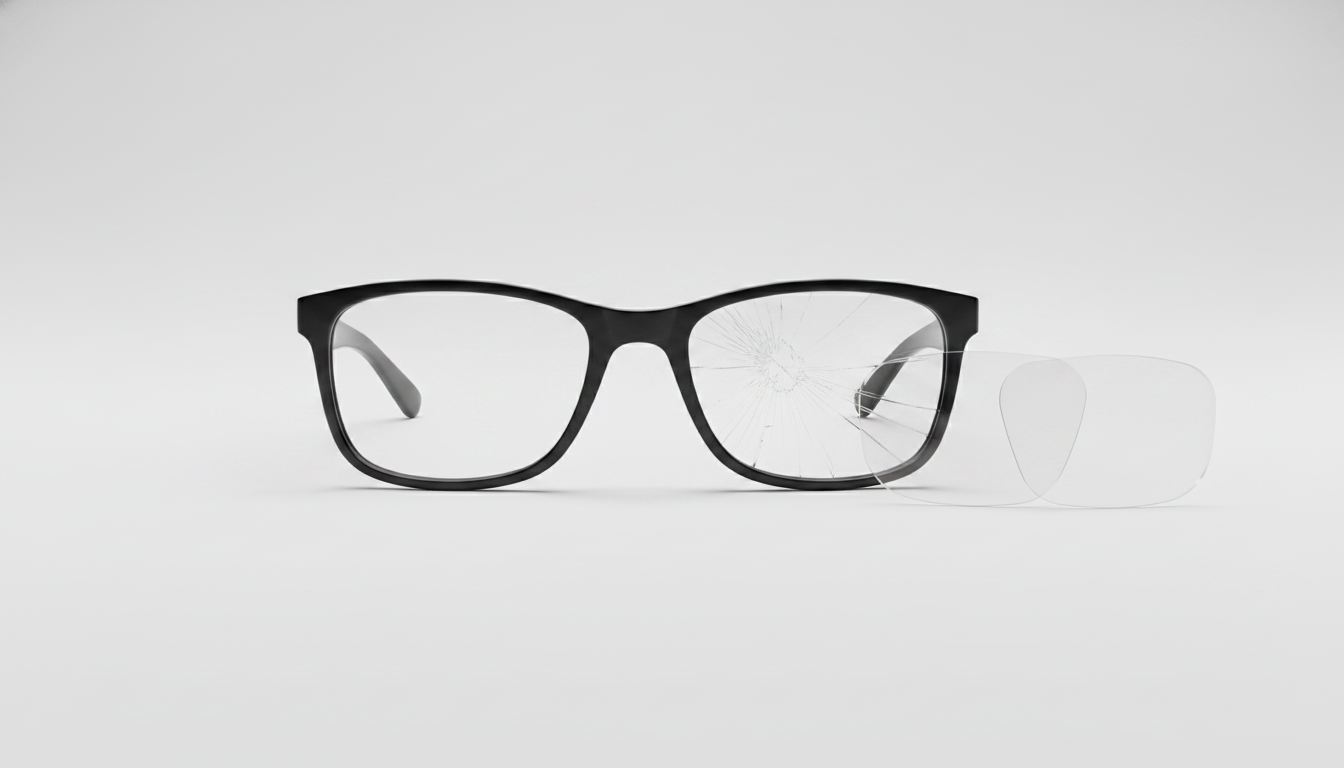
Als het montuur nog werkt en het probleem beperkt blijft tot bekraste, wazige, beschadigde of ongeschikte lenzen, zijn vervangende lenzen meestal de juiste oplossing. Blijf ze gebruiken en houd de toestand in de gaten wanneer een beschadiging de helderheid of het comfort niet beïnvloedt. Pauzeer de bestelling en pak eerst het montuur aan wanneer er ook problemen zijn met de camera, audio, het opladen, de batterij, de bediening, de scharnieren, de uitlijning of de constructie.
Vervang de lenzen als het montuur werkt en het lensprobleem uw gebruik beïnvloedt
Vervang de lenzen wanneer een probleem aan het oppervlak uw zicht, comfort of beoogde gebruik consequent belemmert en het montuur betrouwbaar blijft. Er is geen vaste termijn voor vervanging. Baseer uw beslissing daarom op de toestand van de lenzen en het montuur, niet op de leeftijd van de bril.
- Vervang de lenzen: Krassen, waas, beschadiging van de coating, verminderd zicht of een ongewenste lenseigenschap zijn redenen om vervanging te overwegen wanneer ze u blijven afleiden of het oncomfortabel maken de bril te gebruiken. Krassen die helder of comfortabel kijken belemmeren, kunnen een redelijke aanleiding zijn om de lenzen te vervangen, ook wanneer het montuur zelf nog normaal werkt. De American Academy of Ophthalmology merkt op dat storende krassen kunnen bijdragen aan vermoeide ogen of hoofdpijn, maar deze algemene richtlijn voor brillen toont geen effect op opgenomen camerabeelden aan.
- Blijf ze gebruiken en houd de toestand in de gaten: Een kleine beschadiging die uw zicht of comfort niet beïnvloedt, kan worden gemonitord. Reinig de lenzen met een geschikte methode voor lensverzorging, maar beschouw permanente oppervlakteschade als blijvend. Door te reinigen herstelt u een bekraste coating niet. U moet ook schurende doe-het-zelfmethoden om krassen te verwijderen vermijden, zoals tandpasta of zuiveringszout.
- Pauzeer voor ondersteuning of een oplossing voor het montuur: Een gebarsten of verbogen montuur, onbetrouwbare elektronica, een defecte camera of audio, problemen met opladen of de batterij, beschadigde scharnieren, een slechte uitlijning of structurele schade wijst op meer dan alleen een lensreparatie. Een nieuwe lens zal een afzonderlijk montuurprobleem waarschijnlijk niet oplossen.
Bij een slimme bril met een camera en audio moet u het zicht van de drager gescheiden houden van de cameramodule. Een bekraste lens kan de drager afleiden, maar het aangeleverde bewijs toont niet aan dat vervanging de opnamen zal verbeteren. Behandel een opnameprobleem als een afzonderlijke diagnose van het camerapad of beeldkader.

Controleer of de beschadiging in de lens of in het montuur van de slimme bril zit
Een verklaring die uitsluitend bij de lens ligt, is het meest aannemelijk wanneer het probleem op het lensoppervlak of in het gezichtsveld van de drager blijft, terwijl de onafhankelijke functies van het montuur betrouwbaar blijven werken. Gebruik deze volgorde om die mogelijkheden van elkaar te onderscheiden voordat je koopt.
- Bekijk het probleem aan de lens. Let vanuit je normale kijkpositie op krassen, waas, beschadigde coating, een ongewenste tint of verminderd zicht. Een zichtbare beschadiging op zichzelf bewijst niet dat de cameramodule is aangetast.
- Test het montuur afzonderlijk. Controleer of de bediening, audio, het opladen, het batterijgedrag, de scharnieren, de uitlijning en andere montuurfuncties naar behoren werken. Behandel bij een slimme bril met camera en audio opnameproblemen ook als een afzonderlijk probleem, in plaats van aan te nemen dat de lens de oorzaak is.
- Vergelijk het probleem met de voorgestelde reparatie. Lensvervanging kan een probleem met het lensoppervlak of het zicht oplossen wanneer het montuur intact is. Je kunt er niet van uitgaan dat hiermee elektronica, een cameramodule, een beschadigd scharnier of een verbogen montuur wordt gerepareerd.
- Stop voordat je iets forceert. Wrik een lens niet los, demonteer geen elektronica en oefen geen druk uit als het onderdeel niet loskomt zoals aangegeven. Als het montuur beschadigd is, het probleem na een correcte lensvervanging blijft bestaan of de modelspecifieke aanpak niet duidelijk is, neem dan contact op met de klantenservice of kies een oplossing voor het volledige montuur.
Voor algemene onderhoudsinformatie kan de onderhoudsgids voor camerabrillen je helpen om routineonderhoud te onderscheiden van een beslissing over lensvervanging. De gids bewijst niet dat schoonmaken permanente krassen verwijdert of dat één onderhoudsroutine voor elk model geldt.
Bevestig het exacte model, het lenstype en de camera-indeling voordat je bestelt
De exacte modelidentificatie komt op de eerste plaats. Een vermelding van een slimme bril of Bluetooth-slimme bril is niet voldoende om de pasvorm vast te stellen, omdat lensvorm, functieopties, montuuropbouw en camerapositie per model kunnen verschillen.
| Controleren | Waarom dit belangrijk is | Wat je moet bevestigen |
|---|---|---|
| Exacte modelidentificatie | Vervangende lenzen worden geselecteerd op basis van het montuurmodel, niet op basis van de algemene productcategorie. | Noteer de modelnaam of identificatie die op het montuur, de verpakking, het orderoverzicht of de officiële productpagina staat. |
| Lenstype of -eigenschap | Heldere, meekleurende, gepolariseerde, blauwlichtfilterende en andere opties dienen verschillende kijkvoorkeuren en zijn mogelijk niet onderling uitwisselbaar. | Stem de voor het bevestigde model weergegeven lenseigenschap af, niet alleen een vergelijkbaar uitziende optie. |
| Cameraopening en vrije ruimte | Voor een camerabril zijn een onbelemmerd camerapad en een lensvorm nodig die bij de montuurindeling hoort. | Bevestig indien van toepassing de opening, vrije ruimte en het zichtpad in de exacte modellisting, handleiding of reactie van de klantenservice. |
| Gezichtsveld | Ga er niet van uit dat een vervanging hetzelfde zichtpad behoudt alleen omdat deze er vergelijkbaar uitziet. | Gebruik modelspecifieke informatie over het gezichtsveld wanneer de fabrikant die verstrekt. |
| Montuurvorm of -maat | De lens moet in de bedoelde montuurgeometrie passen. | Stem de voor het model geïdentificeerde montuurvorm of -maat af en stop als de lijst deze relatie onduidelijk laat. |

De lijst met modelspecifieke vervangingslenzen is het juiste commerciële startpunt nadat je het montuur hebt geïdentificeerd. De beschikbare keuzes zijn geordend op model en lenstype, waaronder vermelde heldere, meekleurende, gepolariseerde, blauwlichtfilterende en andere opties. De lijst bewijst geen universele compatibiliteit, exacte cameravrijheid of een bepaald gezichtsveldresultaat voor elk model. Als een vereist veld voor cameraconfiguratie of pasvorm ontbreekt, vraag dan om modelspecifieke bevestiging in plaats van te gokken.
Kies pas een lensoptie nadat de modelmatch is bevestigd
Kies de lenseigenschap pas nadat je het model hebt bevestigd, niet eerder. Deze modelgerichte aanpak helpt je het daadwerkelijke probleem aan te pakken, of het nu gaat om helderheid, oppervlakt schade, een voorkeur voor bepaalde lichtomstandigheden of een functionele lenswijziging, zonder een visueel vergelijkbare lens als bewijs van compatibiliteit te beschouwen.
Voor vervanging wegens onscherpte of schade
Als je doel is om weer een helder, bruikbaar zicht te krijgen, bekijk dan eerst de vermelde vervangingslensopties voor het bevestigde model. Vergelijk vervolgens het lenstype van de optie met je bestaande montuur en controleer bij camerabril ook de cameraopening en het zichtpad. De OHO Sunshine-catalogus biedt een handige route naar vervangingslensopties, maar de huidige keuzelijst en modellabels blijven bepalend voor de aankoop. Een lens die er op een productafbeelding goed uitziet, is niet automatisch de juiste vervanging voor je montuur.
Voor een wijziging van de lenseigenschappen
Als je wilt veranderen hoe de lenzen functioneren of eruitzien, vergelijk dan de beschikbare eigenschapslabels met je daadwerkelijke gebruik. De productvermelding bevat opties zoals helder, meekleurend, gepolariseerd, blauwlichtfilterend, meekleurend met blauwlichtfilter, geel en andere getinte varianten. Beschouw dit als opties die je moet afstemmen op het bevestigde model, niet als onderling uitwisselbare upgrades voor alle lenzen van slimme brillen. Een verandering van eigenschappen neemt ook niet weg dat je de indeling van het montuur of de camerabaan moet controleren.
Dit onderscheid is belangrijk voor zowel camerabrillen als slimme Bluetooth-brillen. Een montuur met camera en audio heeft een afzonderlijke camerabaan die vrij moet blijven, terwijl slimme brillen met Bluetooth mogelijk alleen een kijkdoel voor de lenzen hebben. In beide gevallen bepaalt de modelidentiteit de beslissing over vervanging. OHO SUNSHINE Primex EIS Camera Glasses-Ultra HD with Image Stabilizer & Photochromic Lenses is een voorbeeld van een montuur met camera en audio, maar de verstrekte productgegevens bevestigen niet of vervangende lenzen passen, of er voldoende ruimte voor de camera is en of de opnameprestaties behouden blijven.
Bepaal of je moet bestellen, de vervangingsinstructies moet volgen of contact moet opnemen met de klantenservice
Zodra het montuur en model duidelijk overeenkomen, volg je deze korte actieroute. Zo houd je een lensbestelling gescheiden van een montuurreparatie en heb je een duidelijk stoppunt wanneer de beschikbare informatie onvolledig is.
- Documenteer de overeenkomst. Noteer het exacte model, het huidige lenstype, de gewenste eigenschap van de vervangende lens, de staat van het montuur en eventuele vereisten voor de camera-opening of de kijkroute.
- Bevestig de juiste vervangingsmethode. Gebruik de instructies voor dat model en ga er niet van uit dat alle slimme Bluetooth-brillen dezelfde verwijderingsmethode gebruiken. De handleiding hoe je de brillenglazen vervangt kan een uitgangspunt zijn voor de informatie van de winkel over het vervangen van lenzen, maar is geen universele installatieprocedure.
- Vervang de lenzen voorzichtig. Volg de modelspecifieke instructies en stop als de lens niet op de beschreven manier kan worden geplaatst of verwijderd. Forceer het onderdeel niet, gebruik geen warmte en demonteer de elektronica niet.
- Test het resultaat en schaal op wanneer dat nodig is. Controleer of de lens goed zit, het zicht helder is, het montuur uitgelijnd blijft en de camera-opening, indien van toepassing, niet wordt geblokkeerd. Als het model onzeker is, de pasvorm onduidelijk blijft, het montuur beschadigd is of het oorspronkelijke probleem aanhoudt, bekijk vervangingsonderdelen per model of neem contact op met de klantenservice voordat je het probleem als uitsluitend een lensprobleem beschouwt.
Als het exacte model en de functie overeenkomen, bekijk dan de toepasselijke OHO Sunshine-vermelding voor vervangingsglazen. Als dit niet is bevestigd, is ondersteuning de beste volgende stap, niet een bestelling met universele pasvorm. Een intact montuur plus een probleem met de glazen dat het gebruik beïnvloedt, rechtvaardigt modelspecifieke vervanging; een probleem met het montuur of de elektronica vereist een andere reparatieroute.
Veelgestelde vragen
Kunnen de glazen van een slimme bril worden vervangen?
Ja, vervanging van alleen de glazen kan geschikt zijn wanneer het montuur goed werkt en er een compatibele optie voor dat exacte model bestaat. Krassen, waas, beschadiging van de coating of een ongeschikte glasfunctie kunnen reden zijn voor vervanging wanneer ze je zicht of comfort beïnvloeden. Symptomen met betrekking tot de camera, audio, het opladen, de batterij, het scharnier, de uitlijning of de constructie vereisen een afzonderlijke diagnose van het montuur.
Hoe vind ik de juiste vervangingsglazen voor mijn slimme bril?
Begin met de exacte modelidentificatie en stem vervolgens het type glas of de functie in de vervangingsvermelding daarop af. Als de bril een camera bevat, controleer dan de cameraopening, vrije ruimte, zichtlijn en informatie over het gezichtsveld wanneer de modeldocumentatie die vermeldt. Wanneer een van deze gegevens ontbreekt, vraag dan om modelspecifieke bevestiging voordat je bestelt.
Wanneer moet ik het montuur vervangen in plaats van de glazen?
Kies voor een montuurgerichte oplossing wanneer het montuur gebarsten of verbogen is, niet goed uitgelijnd is, elektrisch onbetrouwbaar is of rond de scharnieren beschadigd is. Problemen met de camera, audio, het opladen, de batterij of de bediening wijzen ook op meer dan alleen een reparatie van de glazen. Pauzeer de bestelling en neem contact op met de ondersteuning wanneer het probleem met het montuur blijft bestaan nadat het probleem met de glazen is verholpen.
Kunnen bekraste glazen de beeldopnames van een camerabril beïnvloeden?
Ga daar niet van uit. Krassen kunnen het zicht van de drager belemmeren, maar het aangeleverde bewijs toont niet aan dat ze de opgenomen beelden beïnvloeden. Een probleem met beeldopnames vereist een afzonderlijke controle van de cameramodule, de cameraopening en het gedrag van het montuur voor het exacte model.
Passen verschillende functies van vervangingsglazen op hetzelfde smartbrillenmodel?
Niet automatisch. Heldere, gepolariseerde, meekleurende, gele en blauwlichtblokkerende opties zijn nog steeds afhankelijk van de exacte modelvermelding en montuurlayout. Selecteer de functie alleen uit de opties die bij jouw model horen en beschouw een niet-vermelde of visueel vergelijkbare optie als onbevestigd totdat de fabrikant dit bevestigt.




Laat een reactie achter
Deze site wordt beschermd door hCaptcha en het privacybeleid en de servicevoorwaarden van hCaptcha zijn van toepassing.