
























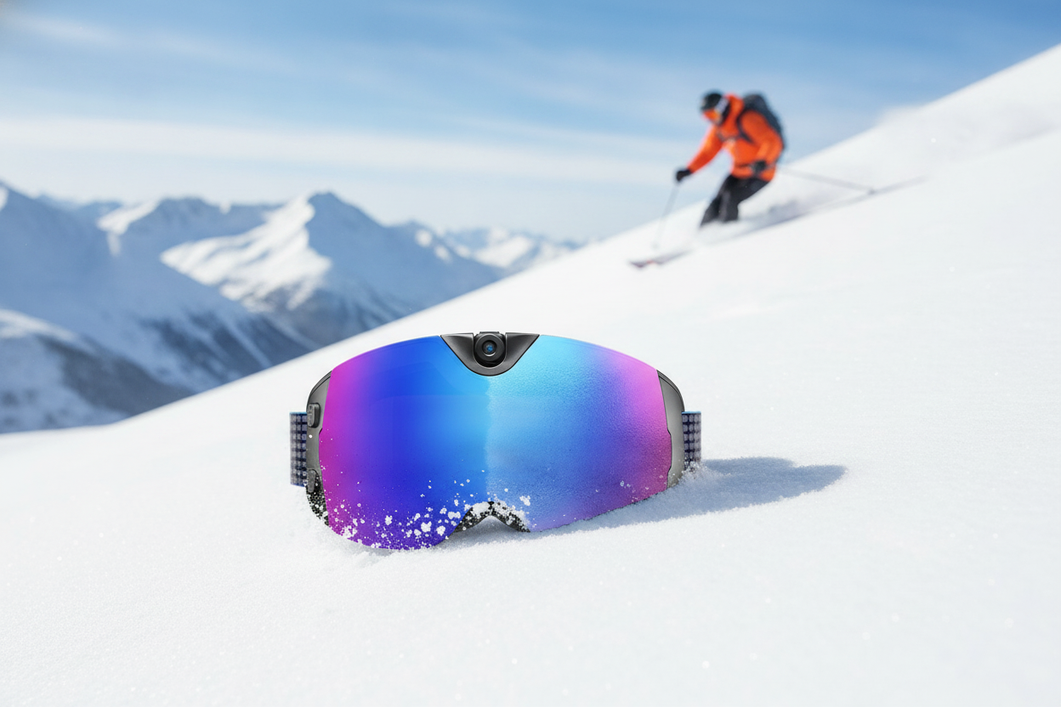
L'affidabilità degli occhiali da sci intelligenti quando fa freddo dipende da quattro abitudini: ridurre il consumo evitabile della batteria, mantenere liberi il flusso d'aria e la lente, asciugare l'umidità prima di riporli o ricaricarli e seguire le istruzioni esatte del modello. Le basse temperature possono rendere meno prevedibile l'autonomia, mentre i passaggi tra ambienti umidi e asciutti e la neve accumulata possono compromettere la visibilità. Non esistono valori universali di temperatura, autonomia, tempo di asciugatura o attesa prima della ricarica validi per ogni modello; usa quindi le procedure riportate di seguito come indicazioni conservative per la cura, non come garanzia delle prestazioni.

Proteggi la durata della batteria quando fa freddo
Le basse temperature possono rendere meno prevedibili le prestazioni della batteria, quindi la risposta più sicura è una gestione pratica dell'energia, non una modifica ipotetica dell'autonomia. Disattiva le funzioni che non ti servono, ripara gli occhiali tra una discesa e l'altra e controlla che non ci sia umidità prima di ricaricarli.
Riduci il consumo evitabile della batteria tra una discesa e l'altra
La registrazione, i display attivi, le funzioni wireless e i controlli ripetuti dello stato consumano energia. Quando aspetti nel rifugio o in coda alla seggiovia, interrompi la registrazione e qualsiasi funzione attiva di cui non hai bisogno. Evita di riattivare ripetutamente il dispositivo solo per controllarne lo stato.
Organizzati in base alle condizioni, invece di presumere che l'autonomia che osservi al chiuso sia la stessa in una giornata fredda. La pagina del prodotto Skyshot indica un'autonomia specifica del modello di 90 minuti, ma non si tratta di una garanzia per il freddo. Se usi quel modello, consulta le indicazioni sul tempo di registrazione degli occhiali con videocamera come informazioni aggiuntive per la pianificazione, quindi segui le istruzioni aggiornate del prodotto.
- Interrompi la registrazione e le altre funzioni attive tra una discesa e l'altra.
- Limita i controlli non necessari della batteria.
- Porta o posiziona gli occhiali in un luogo riparato, invece di lasciarli esposti al vento, alla neve o al calore diretto.
Riscaldali e ricaricali con cautela
Sposta gli occhiali freddi o umidi in un ambiente asciutto prima di ricaricarli. Controlla che nella porta di ricarica e nell'area del cavo non ci siano neve o tracce visibili di umidità; non collegare un dispositivo che sembra bagnato o si comporta in modo insolito.
Usa il caricabatterie fornito o approvato dal produttore e segui le istruzioni del modello. Le indicazioni generali per le batterie agli ioni di litio raccomandano di caricare e conservare i dispositivi in un luogo fresco e asciutto, riducendo al minimo l'esposizione a temperature estreme, soprattutto durante la ricarica (indicazioni della U.S. Fire Administration). Anche le indicazioni del Texas Department of Insurance consigliano di usare il caricabatterie fornito o approvato dal produttore (indicazioni sulla sicurezza della ricarica). Si tratta di precauzioni generali per le batterie, non di una temperatura di ricarica o di un tempo di attesa specifici per Skyshot.
- Sposta gli occhiali appannati o umidi in un ambiente asciutto.
- Controlla che la porta, il cavo e l'area circostante non presentino neve o umidità visibili.
- Carica il prodotto solo nei modi consentiti dalle istruzioni e interrompi la ricarica se il comportamento è insolito.
Controlla l'appannamento e la condensa prima che ostacolino la visuale
L'appannamento va trattato principalmente come un problema di flusso d'aria, vestibilità, transizione di temperatura e gestione dell'umidità. Gli occhiali da sci con fotocamera antiappannamento possono essere utili nelle condizioni previste, ma nessuna caratteristica della lente garantisce una visuale nitida in ogni combinazione di condizioni meteorologiche, vestibilità del casco, respiro e umidità.
Previeni l'appannamento durante una discesa
Mantieni libere le prese d'aria e i percorsi del flusso d'aria e usa un casco e una vestibilità che non premano il materiale bagnato contro la lente. Evita di intrappolare il respiro caldo o il tessuto umido all'interno dell'area degli occhiali. Quando passi da un rifugio caldo all'aria fredda esterna, una transizione graduale e un flusso d'aria riparato possono contribuire a ridurre la condensa improvvisa.
- Controlla che le prese d'aria non siano ostruite dalla neve, da un cappuccio o dall'imbottitura del casco.
- Assicurati che la vestibilità sia compatibile con il casco e non spinga il tessuto bagnato contro la lente.
- Tieni il respiro e l'umidità lontani dalla lente interna per quanto la vestibilità lo consente.
Il modello esatto è importante. Ad esempio, la pagina del prodotto Skyshot camera ski goggles indica una lente antiappannamento, ma questa caratteristica specifica del modello non dovrebbe diventare un'affermazione universale sull'assenza di appannamento. La nitidezza ottica resta la preoccupazione principale ogni volta che si scia o si pratica snowboard.

Elimina l'appannamento senza graffiare la lente
Se l'appannamento inizia a ostacolare la visuale, interrompi la discesa o spostati in un luogo sicuro e riparato prima di tentare di eliminarlo. Lascia che il flusso d'aria contribuisca e utilizza esclusivamente il metodo di cura delle lenti consigliato per quel prodotto.
Non raschiare il ghiaccio, non trascinare i granelli sulla lente e non strofinare energicamente con un guanto bagnato. Se l'appannamento persiste dopo il miglioramento delle condizioni della superficie e del flusso d'aria, trattalo come un problema da risolvere anziché continuare a fare affidamento su una funzione antiappannamento. La condensa interna persistente rientra nella procedura di assistenza del produttore, non in una riparazione improvvisata.
Pulisci le lenti e gestisci lo scioglimento della neve
L'approccio generale più sicuro alla cura degli occhiali da neve consiste nel rimuovere prima i detriti, utilizzare esclusivamente un metodo di pulizia approvato e lasciare asciugare l'umidità accessibile prima di riporli. Tieni i liquidi non verificati lontani da rivestimenti, schiuma, comandi, aperture della fotocamera e aree di ricarica.
Pulisci la superficie della lente
Inizia rimuovendo neve e granelli. Scuoti delicatamente gli occhiali o rimuovi le particelle senza trascinarle sulla lente; strofinare i granelli mentre sono ancora sulla superficie può causare graffi evitabili. Una volta rimossi i detriti, segui esattamente le istruzioni del prodotto per utilizzare un panno morbido per lenti o un detergente.
- Rimuovi neve, ghiaccio e granelli senza raschiare.
- Utilizza esclusivamente il materiale per lenti pulito e il metodo di pulizia approvati per il modello esatto.
- Lascia asciugare all'aria l'umidità accessibile prima di riporre gli occhiali in una custodia.
Non utilizzare detergenti per vetri domestici, solventi, panni abrasivi, sostanze chimiche antiappannamento improvvisate o strumenti appuntiti, a meno che il produttore non autorizzi esplicitamente un prodotto specifico. Il rivestimento esatto della lente e i materiali dell'area della fotocamera non sono stabiliti qui, pertanto il manuale del modello ha la precedenza su un consiglio generale di pulizia. Se in seguito devi verificare una sostituzione specifica per il modello, confronta la maschera esatta con l'inserzione delle lenti sostitutive Skyshot.
Controlla la montatura, la schiuma e le aperture
Dopo aver pulito la lente, controlla la montatura, la schiuma, le prese d'aria, i pulsanti, l'area della fotocamera e la porta di ricarica. Tampona delicatamente l'umidità accessibile, se consentito dalle istruzioni del prodotto, lascia asciugare la maschera aperta e controlla la presenza di neve sciolta o residui nelle giunture e nelle aperture.
Smetti di utilizzare la maschera e consulta le istruzioni del prodotto o l'assistenza del produttore se sembra esserci del liquido all'interno del dispositivo, la condensa rimane vicino ai componenti interni o la ricarica diventa anomala. Non aprire l'alloggiamento e non tentare di espellere l'umidità con il calore diretto. Si tratta di un problema da sottoporre all'assistenza del dispositivo, non di una normale questione di manutenzione di una maschera da neve.
Scegli il passaggio di cura adatto alla condizione
Abbina l'azione meno aggressiva a ciò che puoi effettivamente vedere: rimuovi il materiale non aderente, pulisci i residui approvati, asciuga l'umidità accessibile oppure verifica una sostituzione per il modello esatto quando il danno o la perdita persistente di nitidezza rimangono. Una lente sostitutiva non è una soluzione universale per l'umidità interna o il comportamento dei componenti elettronici.
| Condizione | Prossimo passaggio consigliato | Da evitare |
|---|---|---|
| Neve leggera, acqua o residui rimovibili | Rimuovi le particelle non aderenti, quindi usa il metodo approvato per la cura delle lenti e lascia asciugare all'aria l'umidità accessibile. | Strofinare la lente con residui abrasivi o utilizzare un detergente non verificato. |
| Appannamento o condensa persistenti | Spostati in un luogo riparato, migliora il ricambio d'aria e distingui l'appannamento superficiale dalla possibile umidità interna. | Continuare la discesa con la visuale ostruita o presumere che la funzione antiappannamento risolva il problema. |
| Graffi, crepe o altri danni visibili alla lente | Smetti di considerarlo un problema di pulizia e verifica una sostituzione per il modello esatto. | Presumere che una lente qualsiasi per maschere da neve sia compatibile o che la sostituzione risolva i problemi elettronici. |
| Umidità vicino alle aperture o all'interno del dispositivo | Non utilizzarlo per la ricarica finché non sarà ispezionato e gestito secondo le istruzioni di assistenza del prodotto. | Calore diretto, smontaggio improvvisato o ricarica in presenza di umidità visibile. |
| La lente rimane poco nitida dopo una pulizia approvata | Confronta il danno o il problema di nitidezza con le indicazioni del modello per la sostituzione e le opzioni di assistenza. | Continuare a utilizzare una lente che impedisce una visione nitida. |
L'inserzione delle lenti sostitutive Skyshot è associata a quella famiglia di prodotti, ma le informazioni disponibili non stabiliscono la compatibilità universale, il comportamento del rivestimento o l'adattamento tra i vari modelli. Verifica il modello esatto, il tipo di lente e le istruzioni del produttore prima di acquistare o installare una sostituzione.
Riponi correttamente la maschera da sci intelligente dopo ogni giornata
Una routine affidabile è semplice: rimuovi la neve libera, arieggia e asciuga la maschera, proteggi la lente e ispeziona il dispositivo prima della prossima uscita o ricarica. Non chiudere una maschera da sci intelligente umida in una custodia, in tasca o in una borsa per l'attrezzatura.
Esegui un ripristino tra una discesa e l'altra
Tra una discesa e l'altra, rimuovi la neve senza sfregare la sabbia sulla lente. Posiziona la maschera in un luogo riparato e ventilato invece di chiuderla in una custodia umida, quindi controlla la visuale e i comandi prima di tornare all'aperto.
- Rimuovi la neve e i detriti liberi senza raschiare.
- Lascia la maschera aperta in un luogo riparato e ventilato.
- Controlla la lente e i comandi prima della prossima discesa.
Se la maschera è visibilmente umida, dai priorità all'asciugatura e all'ispezione invece che alla ricarica. Evita il calore diretto e non dedurre un tempo di asciugatura fisso da questa routine generale.
Completa il controllo notturno
A fine giornata, verifica che la lente, la schiuma, le prese d'aria, l'area della fotocamera e la porta di ricarica siano visibilmente privi di umidità accessibile. Proteggi la lente da chiavi, attrezzi, granelli e altri oggetti liberi e conserva la maschera in un luogo pulito e asciutto, secondo le istruzioni del modello.
Prima della prossima uscita, ripeti l'ispezione invece di presumere che la maschera si sia asciugata completamente all'interno di una borsa chiusa. Per un contesto più ampio sulla manutenzione, consulta questi consigli per la cura degli occhiali con fotocamera, quindi usa il manuale esatto del prodotto per i requisiti specifici del modello relativi alla conservazione e alla ricarica.
Domande frequenti
Posso caricare subito una maschera da sci intelligente dopo averla portata al chiuso?
Non se sulla maschera o nell'area di ricarica sono ancora presenti neve o umidità visibile. Spostala in un ambiente asciutto, controlla la porta e il cavo e segui le istruzioni esatte del prodotto; non inventare un tempo di attesa o una regola sulla temperatura validi universalmente.
Cosa devo fare se compare condensa all'interno di una maschera da sci intelligente?
Considera la condensa interna una condizione che richiede di interrompere l'uso e chiedere assistenza. Tieni la maschera lontana dal calore diretto, non improvvisare lo smontaggio e contatta il produttore o segui la procedura di assistenza prevista; la sostituzione della lente potrebbe non risolvere l'umidità che interessa i componenti elettronici.
Posso usare un normale detergente per vetri sulle lenti delle maschere da neve?
Non dare per scontato che il detergente per vetri domestico sia compatibile con il rivestimento della lente, l'area della fotocamera o la schiuma. Controlla le istruzioni per la cura del modello esatto e usa solo un detergente o un metodo approvato; se non è indicato alcun metodo, rimuovi i detriti liberi e chiedi indicazioni sul prodotto prima di applicare qualsiasi liquido.
Quando devo sostituire la lente di una maschera da sci intelligente invece di pulirla?
Rimuovi prima la neve, l'acqua e i residui, oppure asciugali. Valuta le opzioni di sostituzione se rimangono graffi, crepe, danni visibili o una perdita persistente di nitidezza, e verifica il modello esatto e la compatibilità della lente prima dell'acquisto; l'umidità interna o i guasti elettronici richiedono una valutazione separata da parte dell'assistenza.




Lascia un commento
Questo sito è protetto da hCaptcha e applica le Norme sulla privacy e i Termini di servizio di hCaptcha.