
























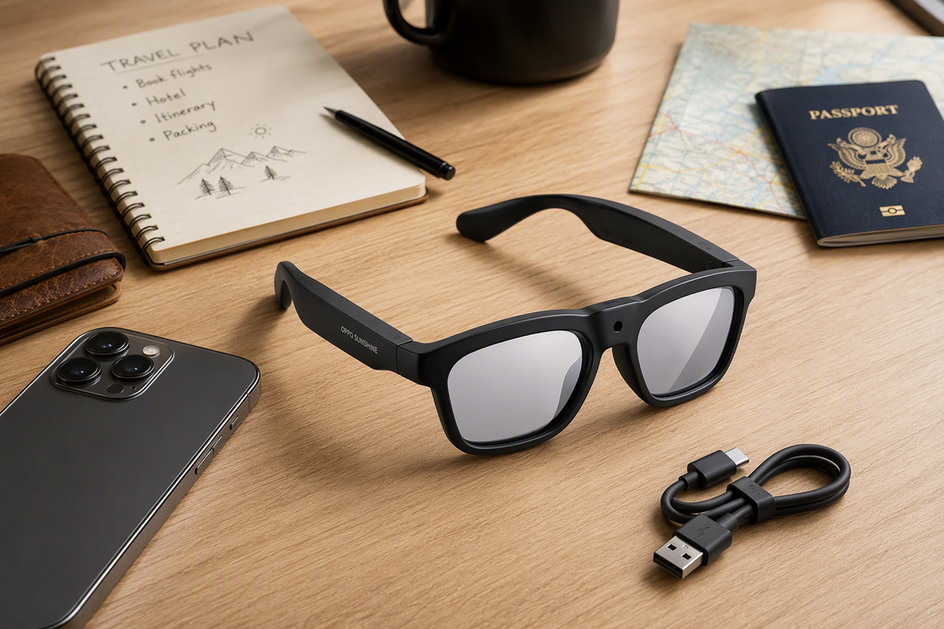
If you want hands-free photos, video, calls, music, or spoken AI help, smart glasses with a camera are the right starting point. If you need directions, captions, notifications, or a private screen to appear in your view, you need display-oriented glasses instead. A camera does not automatically mean a display. Many camera smart glasses rely entirely on audio, voice control, and an app, with no visual output in the lenses.
Camera-First or Display Glasses: The Short Answer
That distinction, capture and audio versus visible output, should drive your shopping. AI features, translation, and Bluetooth pairing all come after that basic choice. The table below shows how the two categories typically compare on the factors that matter most.

| Decision factor | Camera-first smart glasses | Display-oriented glasses |
|---|---|---|
| Camera and capture | Built around first-person photo and video capture | Capture is optional; the focus is visual output, not recording |
| Audio and calls | Open-ear speakers, microphones, and calls are common | Audio may be secondary to the display feature |
| AI or translation | Spoken translation and voice assistants are common when listed | Visual translation or captions require a documented display |
| In-lens display | Not included unless explicitly listed | Core feature; text, maps, or media appear in the lens |
| Phone or host dependence | Often depends on a phone and app for AI, sharing, and calls | Usually needs a phone, computer, or console for video output |
| Typical use | Hands-free recording, calls, music, and spoken assistance | Navigation, captions, notifications, and private-screen entertainment |
If a private screen, live captions, or turn-by-turn directions in your field of view are non-negotiable, treat explicit display documentation as a hard requirement before you add anything to your cart.
Choose by Goal: Recording, Calls, Translation, Entertainment, or Overlays
Your main task, not the feature list, determines which category fits. Here are five common goals and the category each one points to.

Recording and First-Person Capture
Camera-first smart glasses are the right pick when hands-free photos or video are your main goal. Prioritize camera placement, recording controls, storage, battery life, and comfort over display features. A camera-first pair is not a substitute for visual overlays; it will not show you text or maps while you record.
Calls, Music, and Spoken Assistance
Choose camera-first glasses that specifically list audio, microphone, and phone or app support if you mainly want calls, music, or voice assistance. Open-ear audio can help you stay aware of traffic or nearby conversation, although the fit and listening experience vary from person to person. Keep a compatible phone nearby because some calling and voice-assistant features may route through it. Check the specific product's phone and app requirements.
Translation and AI Help
Spoken translation can work with camera-first AI glasses when the product specifically documents that feature. Visual translation, where captions or subtitles appear in your view, requires a display-oriented product that explicitly supports in-lens text. Before you rely on either option, check the listed language count, phone and app requirements, account setup, Internet dependence, and whether translation works in both directions.
Entertainment and Private Screens
Display-oriented glasses are the category to shop when you want a private virtual screen or want to watch video in your view. Camera-first glasses support entertainment only through audio, such as music or podcasts, not video in the lens. Check the host device's video output, any required cable or adapter, and app compatibility before assuming a display pair will work with your setup.
Navigation, Captions, and Visual Overlays
If you need to read directions, live captions, notifications, or other overlays without looking at your phone, display-oriented glasses are the only category built for that use. A camera, voice assistant, or translation feature does not prove that a product has visual output. Use explicit display documentation, not marketing language, as your purchase threshold.
Verify the Setup Before You Buy
Once you know your category, run through these checks before checkout. Start with the connection path, since it is a common purchase blocker, then check power, camera behavior, and fit.
Phone, App, and Connection Path
- Confirm the phone operating system, companion app, account, Internet access, Bluetooth version, and any host-device or video-output requirement listed for the product.
- For display-oriented glasses, trace the full chain: phone or computer, cable or adapter, and app. Any missing link can block the visual feature.
- For camera-first glasses, check which features work on their own and which require the phone app to be active. AI, sharing, and translation often depend on the app.
Battery, Charging, and Recording Behavior
- Compare the listed battery figure with your actual routine. Continuous recording, audio calls, translation, and standby all use power differently.
- Check charging time, whether the product can record while charging, storage capacity, and how footage transfers off the device.
- Treat each battery number as specific to that product and test condition. Do not compare figures from different glasses as if they were measured the same way.
Camera Controls, Indicators, and Privacy
- Check where the camera sits on the frame and whether that placement matches the point of view you want.
- Confirm how you start and stop recording and whether there is a visible or tactile recording indicator.
- Check how the microphone captures audio and how files are stored and transferred.
- Review the manual or product page for privacy guidance relevant to where you plan to use the glasses.
Lenses, Fit, and Everyday Wearability
- Check the lens type, available prescription or photochromic options, and whether the tint or clarity suits your daily conditions.
- Compare the frame dimensions, weight, bridge, and arm fit with how many hours a day you expect to wear the glasses.
- Note any listed water or weather resistance if you plan to use the glasses outdoors, while cycling, running, or hiking.
Store Options for Defined Camera-First Needs
Once you have settled on a category and completed the setup checks, two of our camera-first models fit specific scenarios. Neither replaces a display if visual overlays are your real requirement.
Edge Pro for Recording Plus Spoken Assistance
We built the Edge Pro camera-and-audio glasses for shoppers who want hands-free capture plus spoken translation, calls, or music rather than an in-lens display. Edge Pro's listed camera, audio, and translation features include 4K video recording at 30 fps, 24MP photos, real-time two-way translation covering 165 languages, Bluetooth 5.3, an open-ear speaker, and a built-in microphone. The frame weighs about 1.46 ounces (41.5 grams) and has photochromic lenses. This combination fits outdoor activities such as cycling or running when you want footage and spoken help without stopping to check your phone. Battery life is listed at 1.5 to 20 hours depending on how you use the glasses. Match that range to your recording and audio routine, and confirm your phone, app, and language requirements before relying on translation in the field.
Primex EIS for Recording-First Buyers
For shoppers who care more about steady footage than AI translation, we recommend the Primex EIS camera glasses. Primex EIS's listed stabilization and recording specifications include 2K Ultra HD video with electronic image stabilization, a built-in microphone, photochromic lenses, and IPX4 water resistance. The glasses weigh about 2.12 ounces (60 grams). This mix suits short, active recording sessions such as cycling, fishing, or running when a steadier clip matters more than translation or an in-lens display. Its listed battery life is 60 minutes. That is a product-specific figure for this use case, not a general benchmark, so plan recording sessions around it rather than assuming a longer runtime.
If your non-negotiable requirement is text, maps, captions, or video appearing in the lens, neither Edge Pro nor Primex EIS is a fit until you find a product with documented display hardware. If you have confirmed that camera-first capture is what you want, browse the full camera glasses collection to compare additional recording-focused options.
FAQs
What's the Difference Between AI Glasses and Smart Glasses?
Smart glasses are the broad category. They can include a camera, audio, a display, or some combination of those features. AI glasses usually refers to models that add voice assistants, translation, or other AI-driven features. The labels overlap, but they are not the same thing. The exact feature set depends on the specific product.
Are Smart Glasses With a Camera Different From Display Glasses?
Yes, at the category level. Camera-first smart glasses prioritize capture and often add audio, while display-oriented glasses add a visual output system so information or media can appear in the lens. Some products combine both types of features, so check the specific listing rather than relying on the category name alone.
Do Smart Glasses Have a Display?
Not automatically. Many smart glasses rely entirely on a camera and audio, with no visual output in the lens. If seeing captions, directions, or a private screen matters to you, look for explicit display, HUD, or microdisplay language in the product documentation before buying.
Can Camera Glasses Support Translation or Calls?
They can, but only when the specific product lists that feature and you have the required phone, app, account, or Internet connection. Spoken translation through open-ear audio is different from visual translation shown as text in the lens. The second option requires a display-equipped product.
What Should I Check Before Buying Camera Glasses?
Confirm that the output channel matches your goal. Then verify phone or app compatibility, battery and charging behavior for your intended use, camera controls and any recording indicator, and lens type and frame fit for all-day wear. Following that order catches most mismatches before checkout.



Laat een reactie achter
Deze site wordt beschermd door hCaptcha en het privacybeleid en de servicevoorwaarden van hCaptcha zijn van toepassing.