
























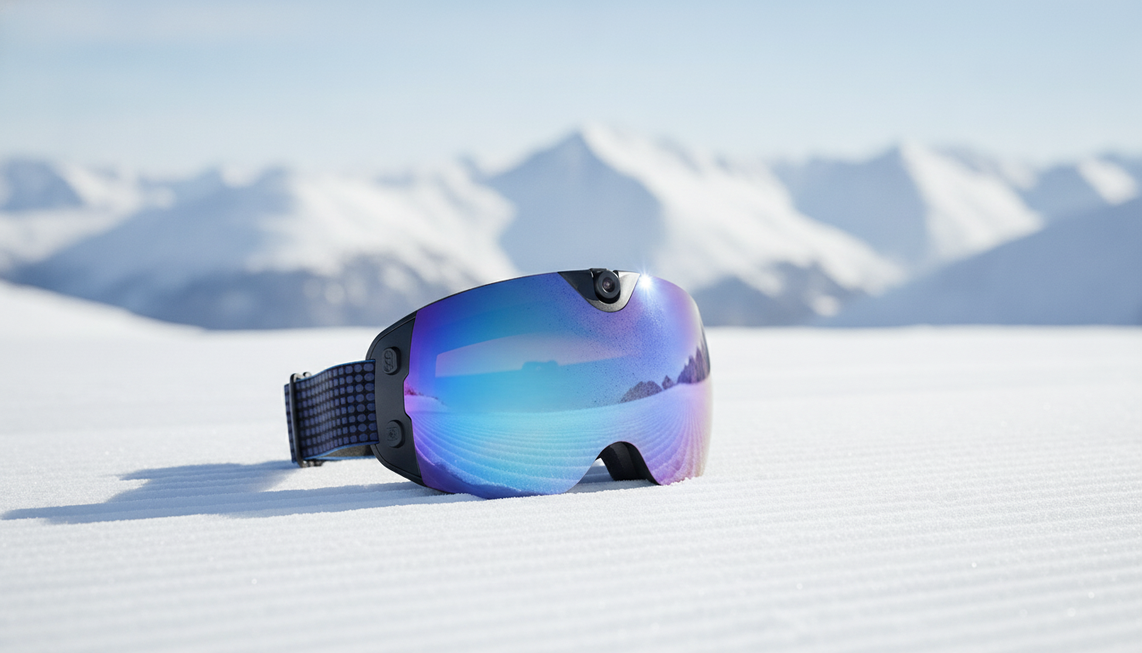
Camera ski goggles for beginners can be a strong first POV setup when your priority is hands-free footage with fewer mounting decisions. They are a weaker choice when you need adjustable placement, multiple viewpoints, or flexible camera control. Before a run, confirm a comfortable fit, clear visibility, stationary control practice, and one short clip that you can transfer and review.
Should Beginners Start With Camera Ski Goggles?
Yes—if your first goal is straightforward first-person footage and you are comfortable with a fixed viewpoint. Integrated goggles reduce the need to carry and mount a separate camera, but that convenience comes with less flexibility than a dedicated action camera, as an independent hands-on review explains. Camera ski goggles for beginners are therefore a conditional choice, not a universal replacement for another setup.
Start with camera goggles when you want to record the direction you are looking, prefer a simpler hands-free arrangement, and will complete the setup checks before moving. Choose another option if the goggles hinder visibility, do not fit comfortably with your helmet, or cannot provide the viewpoint your project requires. Practice the recording controls while stopped and wearing the gloves you plan to use on the ski day. If the fit, lens position, or camera placement interferes with clear vision, do not rely on the goggles for that run.

Does a Fixed Goggle View Match Your First POV Goal?
A fixed goggle camera works well for a beginner making a straightforward clip of the view ahead. Because the camera is integrated with the goggles, the composition follows where you look and how you position your head and body. Test the framing while stationary instead of assuming it will match your intended footage.
This format is less suitable when the project needs a self-facing shot, frequent repositioning, or multiple angles. A separate camera may be a better fit when changing camera positions is central to the edit. The fixed viewpoint is not automatically a drawback; it is the key tradeoff to accept before choosing integrated snow goggles with camera functionality.
What Fit and Camera Details Matter for Camera Ski Goggles for Beginners?
Before buying or relying on camera ski goggles for a ski day, test the physical fit and the complete recording workflow. Try them with the helmet, clothing, and gloves you plan to use. General goggle guidance recommends checking that the helmet and goggles fit comfortably and flush without hindering vision or pushing the goggles down; review smart goggle checks can help organize your buying questions, but it does not replace a hands-on fit check.
Fogging can compromise vision even when a product carries an anti-fog label, so clear visibility is still essential. If the lens fogs or your view becomes compromised, stop and address the goggles before continuing. While stationary, confirm the framing and the model-specific recording-status feedback. A hands-on camera-goggle review can help you learn the buttons and check framing before a run, but controls vary by model.
Finally, check the current instructions for controls, storage, charging, and phone transfer. Wi-Fi may support a phone connection, but it does not mean setup or clip transfer is automatic. Check the product manual before the trip, and test the actual connection and download steps with one clip.
How Do You Test and Record Your First Ski Run?
Treat the first run as a short workflow test, not a full-day production session. Complete every camera operation while stopped, and keep movement control and slope awareness ahead of recording. The National Ski Areas Association's Your Responsibility Code says skiers must stay in control and be able to stop or avoid people and objects.
- Define one modest clip goal. Decide whether you want one short first-person descent segment instead of trying to document the entire ski day.
- Set up while stationary. Put on the intended helmet and gloves, follow the model's instructions, confirm fit and visibility, and check the framing and recording status.
- Capture a short familiar section. Choose a section you know and leave the controls alone while moving. If camera operation distracts you from controlling your movement or monitoring conditions, stop the test.
- Stop before transferring the clip. Once stationary, use the model-specific storage, phone connection, or transfer process. Do not assume Wi-Fi handles every step automatically.
- Review before extending the session. Check whether the viewpoint, visibility, recording status, and transfer worked. If the clip is unusable or the workflow is unclear, correct the setup while stopped before attempting a longer run.

For additional practice, practice glove-friendly controls before the ski day. One successful test clip confirms a starting workflow, not full-day reliability.
When Is a Separate Action Camera a Better First Setup?
A separate action-camera setup is the better first choice when adjustable placement, multiple perspectives, or frequent repositioning is central to the footage. Integrated goggles trade that flexibility for a hands-free arrangement with fewer mounting decisions. The right choice depends on the clip you plan to make, not on a general promise that one category is easier for everyone.
Choose integrated goggles when a fixed first-person view meets your goal and you are willing to test the model-specific controls and transfer process. Choose a separate setup sooner when one viewpoint cannot cover the planned content. Compare setup options for that category-level choice, while keeping all equipment adjustments off the moving slope.
Could Skyshot Fit the Beginner Conditions?
If the integrated-goggle approach fits your footage goal, the Skyshot camera goggles are a relevant product example to evaluate using the same fit and workflow checks. The current Skyshot listing identifies 4K camera/video recording, Wi-Fi, 24M photo, and anti-fog. These features address a desire for integrated recording, phone connectivity, still photos, and a lens feature intended to help with fogging, but they do not establish performance or guarantee clear vision.
Before buying, use the current product details and instructions to confirm fit with your intended helmet and lens configuration, recording controls, storage, charging, and phone-transfer steps. This article does not use battery-life or field-of-view figures to decide fit; the deciding condition is whether the current fit and workflow work with your helmet, visibility needs, and first clip.
Should You Start With Camera Ski Goggles or Choose Another Setup?
Use this table as a readiness check. Start only when the goal, fit, viewpoint, workflow, and first clip all support the integrated format.
| Check | Start with camera ski goggles when | Choose another setup or postpone when |
|---|---|---|
| Footage goal | You want straightforward hands-free first-person run footage. | You need adjustable placement, self-facing footage, or several viewpoints. |
| Fit and visibility | The goggles work comfortably with the intended helmet, clothing, and gloves, with an unobstructed view. | The helmet pushes them down, the fit is uncomfortable, or fogging compromises vision. |
| Viewpoint | You accept footage tied to where you look. | The planned edit depends on repositioning or multiple camera angles. |
| Controls and transfer | You understand the model-specific controls and recording status, and have tested storage or phone transfer while stopped. | The controls, storage, charging, or transfer process remains untested or unclear. |
| First-clip readiness | One short familiar clip has been recorded, transferred or accessed, and reviewed successfully. | The clip, framing, visibility, or workflow failed, or you have not completed a stationary test. |
If every start condition passes, complete one more stationary test with the intended helmet and gloves before recording. If any fit, visibility, control, or viewpoint condition fails, postpone the purchase or choose a more flexible setup rather than trying to solve the problem while moving.
Frequently Asked Questions
Are Camera Ski Goggles Worth It for Beginners?
They may be worth it when hands-free simplicity matters more than camera-placement flexibility. The practical confirmation is not the feature list alone: accept the fixed viewpoint, then review one usable test clip before committing to a longer session.
Are Camera Goggles Easy to Use?
They can eliminate separate mounting decisions, but they are not setup-free. The learning curve is manageable only after you practice the model's controls, recording status, and transfer steps while stationary and wearing your planned gloves.
Can Camera Ski Goggles Replace an Action Camera?
They can be sufficient for simple fixed first-person footage. They are not the better fit when your project depends on adjustable placement, multiple viewpoints, or frequent repositioning, so choose the category that matches the edit you want to make.
How Do Beginners Record Ski Runs?
Start with a stationary setup and test clip, review the viewpoint, then record a short familiar section without touching the controls while moving. Stop, transfer or access the clip, and review it before extending the session.


Lämna en kommentar
Denna webbplats är skyddad av hCaptcha och hCaptchas integritetspolicy . Användarvillkor gäller.