
























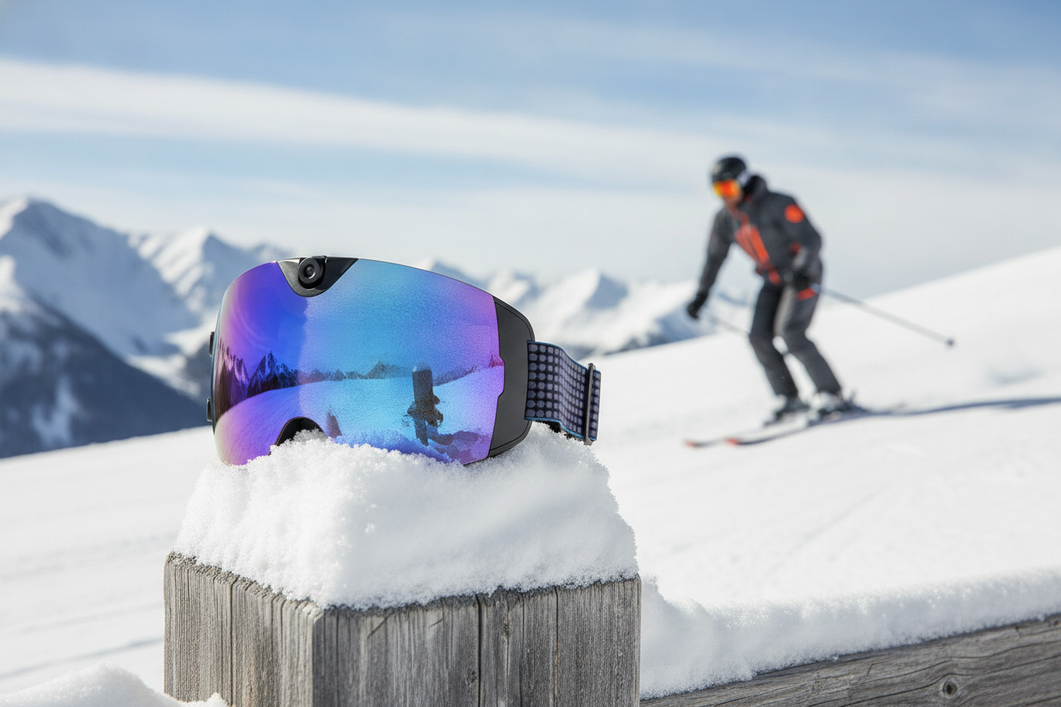
The most important smart ski goggles checks are the ones that affect what you can see, how the goggles fit your helmet, and whether the electronics stay usable on a cold day. Compare resolution, frame rate, stabilization, storage, lens construction, airflow, and light conditions as a group. Then verify the exact helmet interface, glove-friendly controls, cold-weather battery guidance, and replacement-lens support. A headline such as 4K or an anti-fog label is a specification—not proof of smoother footage, clearer vision, or safer performance.

Which Smart Ski Goggles Specs Affect Visibility Most?
Start with the capture workflow and lens conditions you actually ski in. The most useful smart ski goggle features for one resort skier may matter less to someone who records only occasional runs, so compare each specification with the result you want instead of ranking one number on its own.
Resolution and Stabilization for Run Footage
Resolution affects the amount of image detail recorded, while frame rate, stabilization, and storage affect how practical that footage is to capture, keep, and share. Check the model's documentation before assuming that higher resolution means smoother footage or better visibility.
| Specification | What It Helps With | What to Verify |
|---|---|---|
| Resolution | Image detail and cropping flexibility | Recording modes, file size, and whether the mode works with other settings |
| Frame rate | Motion capture and editing choices | Available frame rates at each resolution and the storage demand |
| Stabilization | Camera movement during a run | The stabilization method, supported modes, and whether it changes resolution or battery use |
| Storage | How much footage can be retained | Built-in or removable storage, file transfer, overwrite behavior, and charging access |
Think about the complete path from run to shared clip. If you want short clips for social media, easy transfer and manageable files may matter more than the largest available recording mode. If you want to edit longer footage, confirm storage capacity and file handling before buying. As one clearly labeled example, the 4K camera ski goggles listing specifies 4K at 30 fps, a listed 140° camera field of view, built-in memory, Wi-Fi, USB-C charging, and button and app controls. Those are listed product facts, not independent proof of stabilization or real-world image quality.

Anti-Fog and Visibility Checks
Treat ski goggles with anti-fog performance as a question of construction and conditions, not a guaranteed result. Your helmet, face fit, ventilation, lens shape, temperature, exertion, and light can all affect performance.
Use this checklist before treating an anti-fog or visibility claim as meaningful:
- Lens construction: Check whether the listing explains the lens design, inner and outer layers, and any coatings rather than giving only an anti-fog label.
- Ventilation: Look for airflow openings and whether the frame design could be blocked by a helmet or face covering.
- Tint and light conditions: Match the tint or lens option to your usual bright, overcast, tree-lined, or storm-day conditions. Do not assume one lens works equally well in every setting.
- Peripheral view: Review the frame shape and available testing notes. A listed camera angle is not the same as the useful field of view seen by your eyes.
- Evidence quality: Prefer product documentation or independent testing details. If the seller gives no construction or test information, keep the claim unverified.
A polarized lens or a listed camera angle may be useful, but neither establishes safety, superior visibility, or universal performance. Check the exact lens option and return terms before ordering.
Fit the Goggles to Your Helmet and Field of View
Fit is a purchase condition, not a detail to solve after the electronics look appealing. Confirm that the exact frame, strap, face contact, and camera or control placement work with your helmet and leave your view unobstructed; a generic “helmet-compatible” label is not enough.
Helmet Interface and Face Fit
Use this pre-purchase sequence for helmet-compatible ski goggles:
- Identify the exact helmet model. Note its front shape, brim, vents, and any face shield or communication hardware.
- Compare frame and strap geometry. Check whether the strap can sit in its intended path and whether the helmet presses on the frame, camera, or controls.
- Check the gap and pressure. CDC helmet-and-goggle fit guidance says the helmet should sit snugly over the goggles without a visible gap, but it should not press the goggles down over the eyes. This is a fit guideline, not a universal compatibility or safety guarantee.
- Assess the face seal. Look for gaps around the nose and cheeks, pressure points, and movement when you turn your head or crouch.
- Test movement and access. Consider whether the frame shifts, the strap slips, or the electronics interfere when you look down, adjust your helmet, or wear a neck gaiter.
- Confirm the fallback. Check seller-stated compatibility, dimensions, prescription or over-the-glasses guidance, and the return window before buying.
Prescription and over-the-glasses use need their own check. Interior clearance, frame depth, helmet shape, and the position of any camera housing can change the fit, so do not infer compatibility from the outer lens size.
Field of View and Wearability
Separate the camera’s field-of-view number from the view your eyes receive. Check eye placement, frame depth, nose clearance, peripheral openings, camera position, balance, and pressure after extended wear. If a product lists a wide camera angle, use it to understand the recording perspective—not as a guarantee of human visual coverage.
A useful fit test is to wear the goggles with the intended helmet and gloves while looking across the slope, down toward your bindings, and over each shoulder. Any pressure, shifting, blocked edge view, or control interference is a reason to revisit the size, frame, or return terms before the trip.
Choose Controls You Can Use With Gloves On
Smart features only add value when you can operate and confirm them without removing winter gear. Judge tactile access, status feedback, phone dependence, and file handling as one field workflow, and look for model documentation when the listing leaves a step unclear.
Buttons, Status Feedback, and Glove Use
Check these points before deciding that the controls are practical:
- Can you find the power, record, and stop controls by touch while wearing your usual gloves?
- Does the control provide a clear light, sound, vibration, or other recording confirmation?
- Can you avoid accidental activation when adjusting the strap, helmet, or face covering?
- Can you start and stop recording while the goggles are worn with the helmet secured?
- Does recording work without a phone, or must the phone be paired first?
- What happens if the goggles are recording while the battery runs out?
If the manual does not explain glove operation or recording confirmation, treat that as an unanswered buying question. A product listing that mentions buttons or an app does not establish that every control is easy to use with thick gloves.
Phone Pairing and File Handling
Trace the complete capture-to-share process before paying for smart features.
| Task | What to Verify | Why It Affects the Decision |
|---|---|---|
| Setup | Pairing steps, required app, account needs, and phone compatibility | A complicated first setup can delay use on a trip |
| Recording | Phone-independent operation and status feedback | You may not want to expose a phone on the lift or in snow |
| Transfer | Wi-Fi, cable, removable storage, or computer requirements | Transfer method determines when footage becomes usable |
| Sharing | File format, editing needs, and app export steps | A clip is less useful if the workflow adds unexpected steps |
| Storage and charging | Capacity, overwrite behavior, and access to power | Full memory or a low battery can stop recording even when the camera works |
The smart snow goggle options page can help you browse the category, but a collection page does not prove that every model uses the same controls, app, or transfer method. Verify those details on the exact product page and manual.
Plan for Cold-Weather Battery and Off-Season Storage
Cold-weather battery behavior is model-specific. Cold can reduce lithium-ion battery performance, so compare published operating conditions and runtime test conditions instead of assuming a general runtime applies on the mountain. Research on low-temperature lithium-ion batteries supports this general caution, not a runtime estimate for goggles.
Cold-Weather Battery Questions
Ask the seller or check the manual for:
- The stated operating conditions and the conditions used for any runtime estimate.
- Startup behavior after the goggles have been exposed to cold.
- Whether charging is allowed immediately after cold exposure or only after the product reaches the manual’s specified condition.
- Where the battery is located and whether the design supports a manufacturer-approved external power option.
- How recording settings, pauses, stabilization, wireless connections, and file transfers affect the day’s power plan.
- Which basic functions remain available after the recording battery is depleted.
Do not generalize a listed runtime from one model to another. For example, a product page may state a 90-minute battery life, but that figure should not be treated as a cold-weather guarantee or applied to other models.
Charging, Moisture, and Storage
Off-season care deserves the same attention as runtime. SLAC’s explanation of extreme cold and lithium-ion battery materials supports cautious storage guidance, not a model-specific operating range. For charging and storage, follow the product manual rather than applying a universal temperature rule. NFPA lithium-ion battery guidance advises avoiding extremely hot or cold storage locations and not charging a damaged battery or charger.
Before storing or packing the goggles:
- Dry the goggles and charging hardware as directed by the manual; do not seal away moisture.
- Protect the lens from scratches and keep the product in the stated storage condition.
- Charge only as directed and inspect the battery, cable, and charger for damage first.
- Confirm available storage before the next trip and remove or transfer footage if required.
- Test the controls, recording confirmation, and charging connection before leaving home.
Compare Replacement Lenses and Real-World Value
Replacement support can determine whether smart ski goggles remain useful after the first season. Confirm the exact lens fit, available conditions or tints, installation process, price, and stock before deciding that the electronics justify a premium.
Replacement Lens Availability
Use this comparison table for replacement lenses for ski goggles:
| Lens Question | What to Verify | Why It Matters |
|---|---|---|
| Model fit | Exact goggle model and frame compatibility | A lens that fits another version may not fit yours |
| Quantity | Number of lenses in the package | Prevents an incorrect ownership-cost assumption |
| Conditions or tint | Available light-condition options and tint details | One option may not suit every typical ski day |
| Installation | Replacement method and any required care | Difficult installation can add ownership friction |
| Price and availability | Current price, stock, and seller support | A replacement is not useful if it is unavailable when needed |
The named replacement Skyshot lenses listing identifies a replacement product and states that it includes one pair. That does not establish compatibility with other models, installation details, current price, or long-term availability. Confirm those points before purchase.
A Use-Case Test for the Premium
Use this five-step test rather than asking whether smart goggles are universally worth it:
- Estimate how many ski days you realistically expect this season and next.
- Identify the features you will use on most trips, such as hands-free recording, wireless transfer, or a particular lens option.
- Add ownership friction: charging, storage, app setup, fit checks, replacement lenses, and return risk.
- Verify that the core goggles fit your helmet and provide the lens support you need even if the smart features are used less than expected.
- Buy only if the supported features solve a recurring problem often enough to justify the added cost and care.
For an occasional skier, infrequent use may make replacement support and charging effort more important than maximum camera specifications. A regular resort skier who records most runs may place more weight on glove controls, storage, transfer speed, and a comfortable full-day fit. Neither scenario creates a universal value verdict; the decision follows from actual use.
Before placing the goggles in your cart, verify the exact product page and manual for recording modes, storage, stabilization, controls, battery conditions, charging, and lens fit. Match them to your helmet and usual light conditions, read the return terms, and confirm replacement support. Choose smart goggles when the features you will actually use outweigh the added charging, storage, fit, and replacement obligations.
FAQs
Use these checks to resolve model-specific fit, battery, and travel questions before ordering.
Are Smart Goggles Worth It for Occasional Resort Skiing?
Use frequency should drive the decision. Compare expected ski days, ownership costs, and how often you will use the connected features before paying for electronics. Replacement-lens availability and charging effort may matter more than maximum camera specifications when you ski only a few days each season.
Can I Use Camera-Equipped Goggles With Prescription Glasses?
Only after confirming interior clearance, frame depth, helmet pressure, and the seller’s prescription or over-the-glasses guidance. Check the return terms as well.
What Happens If the Battery Dies During a Ski Run?
The result depends on the model. Check whether recording, wireless features, or controls stop first, and do not rely on a full-day workflow unless the manual explains depleted-state behavior.
Can I Bring Smart Goggles on a Plane?
Check the battery configuration and current airline carry-on guidance before travel, especially for removable batteries or spares. Follow the airline’s lithium-battery instructions.




Leave a comment
This site is protected by hCaptcha and the hCaptcha Privacy Policy and Terms of Service apply.