
























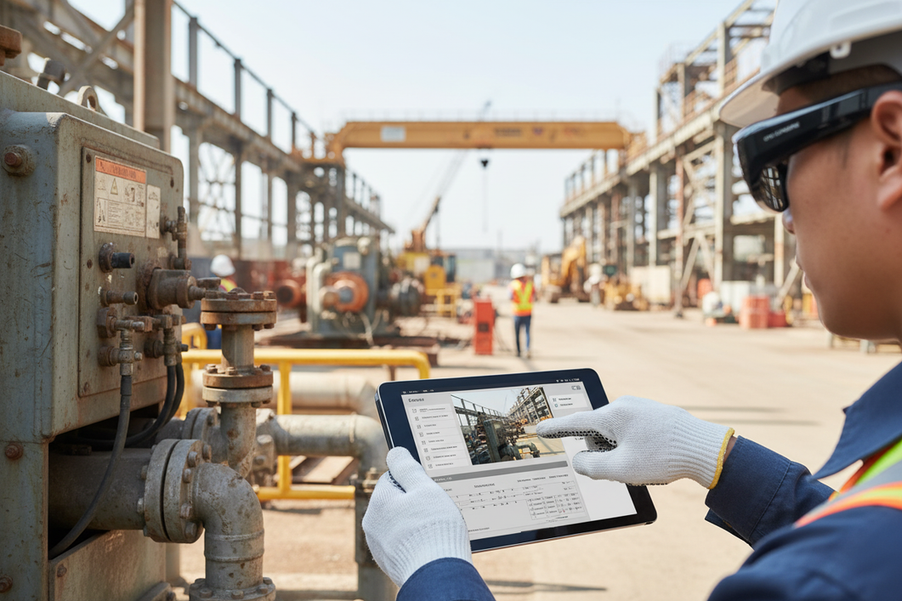
Les lunettes connectées d’inspection de terrain peuvent faciliter une documentation visuelle contrôlée à la première personne, mais elles ne constituent pas à elles seules un système d’inspection complet. Un processus viable commence avant la visite du site : définissez les éléments probants requis, confirmez les autorisations d’enregistrement, testez la capture et le transfert, et établissez une solution de repli locale. Pendant la visite, associez chaque image ou séquence intentionnelle à un constat, interrompez l’enregistrement lorsque des limites de confidentialité ou de sécurité se présentent et utilisez des instruments approuvés pour les mesures. Ensuite, constituez un dossier pouvant être examiné et testez l’ensemble du processus avec des utilisateurs et des sites représentatifs avant de choisir l’équipement.

Préparez l’inspection avant l’enregistrement
Avant la visite, déterminez si la capture proposée est nécessaire, autorisée, techniquement récupérable et utile au dossier d’inspection final. Considérez les lunettes comme un composant de ce processus ; une caméra, un stockage ou un indicateur ne résout pas à lui seul les questions de politique et de droit.
- Définissez les éléments probants. Notez l’objectif de l’inspection, les actifs ou emplacements concernés, les champs de constat et les contenus multimédias nécessaires pour étayer chaque conclusion. Cela évite que l’enregistrement continu ne collecte davantage de séquences que le rapport ne l’exige.
- Confirmez les limites de l’enregistrement. Vérifiez les instructions du client, les règles du site, la notification des participants, les zones restreintes et la capture éventuelle du son. Les règles relatives à l’audio et à la vidéo varient selon la juridiction et le contexte ; vérifiez donc le droit applicable de l’État, la politique du site et le processus de l’organisation avant d’enregistrer des personnes ou des conversations. Les recommandations du Maryland en matière d’enregistrement montrent pourquoi il ne faut pas appliquer une seule hypothèse de consentement à l’ensemble du pays.
- Vérifiez l’appareil et le chemin d’enregistrement. Vérifiez la charge, l’espace de stockage disponible, les commandes à un bouton ou autres commandes, la date et l’heure, la visibilité de l’objectif, le fonctionnement du microphone et la destination de transfert approuvée. Un appareil qui capture des séquences mais ne peut pas produire un enregistrement exploitable et autorisé n’a pas réussi la vérification du processus.
- Prévoyez le travail hors ligne. Décidez où les fichiers resteront temporairement, comment ils seront transférés une fois la connectivité rétablie et qui sera responsable de cette étape. Ne faites pas du partage en direct le seul moyen de conserver les éléments probants.
- Informez les personnes concernées. Expliquez quand l’enregistrement commence et s’arrête, qui peut consulter le contenu, et ce qui se passe si quelqu’un s’y oppose ou entre dans le champ. Un indicateur d’enregistrement visible et une notification des participants sont des contrôles de processus utiles, mais un indicateur seul n’établit pas la conformité ; les recommandations de la FTC sur les indicateurs d’enregistrement appuient ce contrôle sans remplacer l’examen applicable.
Prenez explicitement la décision d’arrêter l’enregistrement avant le départ : si l’autorisation, le stockage, le transfert ou la solution de repli approuvée n’est pas réglé, ne commencez pas la capture avant que le responsable ou le propriétaire de la politique ne le résolve. Une politique relative aux lunettes intelligentes sur le lieu de travail peut aider à la planification interne, mais elle ne remplace pas un examen propre au site ou un examen juridique.

Capturez les preuves et les notes mains libres
La capture mains libres est particulièrement utile lorsqu’elle préserve la séquence d’inspection sans brouiller la différence entre ce que montre une caméra et ce qu’un inspecteur mesure, interprète ou recommande. L’inspecteur reste responsable de la procédure approuvée, et pas seulement de l’image.
Associez chaque capture à un constat
Attribuez à chaque image ou clip un objectif traçable avant d’enregistrer la vue rapprochée. Une courte séquence orale ou écrite peut maintenir le lien entre la documentation d’inspection mains libres et le rapport final :
- Identifiez l’équipement et le constat. Indiquez ou saisissez l’identifiant du constat, l’emplacement et le composant concerné avant la vue rapprochée.
- Décrivez l’état observé. Décrivez uniquement ce qui est visible : par exemple, une fissure, un point d’accès bloqué, une étiquette manquante ou de la corrosion visible. Signalez l’incertitude au lieu de présenter une interprétation comme un fait.
- Capturez la vue pertinente. Prenez une vue d’ensemble lorsque l’emplacement est important, puis une vue rapprochée de l’état observé. Recadrez si l’élément n’est pas assez clair pour permettre son examen.
- Consignez l’action suivante. Notez la gravité ou le statut conformément au processus de l’équipe, attribuez le suivi et indiquez si une mesure ou l’examen par un spécialiste est encore nécessaire.
Conservez un identifiant de constat cohérent dans le fichier multimédia, la note de terrain, l’entrée du rapport et la tâche de suivi. Ce lien est plus important qu’un enregistrement continu, car il permet au réviseur de comprendre pourquoi le contenu multimédia existe et ce qui reste à résoudre.
Maintenez la caméra dans les limites de l’inspection
Utilisez le cadrage le plus serré qui démontre le constat. Mettez en pause ou recadrez lorsque des personnes, badges, écrans, documents, éléments confidentiels ou zones à accès restreint entrent dans le champ. Si les lunettes enregistrent du son, considérez cela comme une décision d’enregistrement distincte plutôt que comme une fonction accessoire ; les recommandations du Texas sur l’enregistrement audio décrivent les enjeux de confidentialité lorsque les personnes peuvent raisonnablement s’attendre à ce qu’une conversation reste privée.
- Vérifiez le point de vue : ne choisissez pas une position dangereuse uniquement pour obtenir une vue à la première personne.
- Vérifiez la scène : arrêtez-vous lorsqu’une personne non concernée ou des informations protégées entrent dans le cadre.
- Vérifiez les limites des preuves : Un clip vidéo peut documenter l’apparence, mais il n’établit pas automatiquement les dimensions, la température, la force, l’état électrique, la qualité de l’air ou la conformité.
- Changez d’outil si nécessaire : Utilisez les instruments requis, des notes manuelles ou une solution approuvée pour les mesures et les décisions critiques pour la sécurité.
La même règle s’applique aux lunettes d’enregistrement du travail : une catégorie de produits peut aider à trouver du matériel, mais elle n’établit pas que chaque modèle convient à une procédure d’inspection donnée.
Vérifier si les lunettes intelligentes pour les inspections sur le terrain conviennent aux conditions d’inspection
La bonne question n’est pas de savoir si les lunettes intelligentes conviennent généralement. Il s’agit de déterminer si ce site, ce type de preuve, ce contexte de confidentialité et cette condition technique peuvent produire un dossier acceptable sans remplacer un outil ou une procédure requis. Utilisez la matrice ci-dessous comme décision qualitative pour un projet pilote, et non comme un score de performance.
| Condition d’inspection | Situations dans lesquelles des lunettes caméra mains libres peuvent être utiles | Ce qu’il faut vérifier ou utiliser à la place |
|---|---|---|
| Éléments visuels de routine dans une zone autorisée | Capturez le contexte et des vues rapprochées tout en laissant les mains de l’inspecteur libres | Confirmez le cadrage, l’éclairage, le stockage, le transfert et la qualité de l’examen avant de vous fier au processus |
| Déplacements entre des équipements ou des pièces | Conservez une séquence en vue subjective associée aux emplacements et aux identifiants des constatations | Testez la stabilité, les commandes et les déplacements sûrs ; interrompez l’opération lorsque la vue de la caméra devient imprécise |
| Faible luminosité, éblouissement ou conditions extérieures changeantes | Documentez les conditions visibles lorsque la scène reste interprétable | Testez l’éclairage réel et le comportement de l’objectif ; utilisez un éclairage approuvé ou une autre caméra si des détails sont perdus |
| Zones réglementées ou contenus privés | Généralement, ce n’est pas un scénario de capture avec des lunettes caméra | Obtenez l’autorisation du responsable du site ou passez à des notes manuelles ou à une solution approuvée ; les règles locales de confidentialité et les restrictions de propriété peuvent influencer la décision |
| Travaux critiques pour la sécurité ou nécessitant de nombreuses mesures | Ajoutez un contexte visuel autour d’une étape d’inspection réalisée séparément | Utilisez des instruments et des procédures certifiés ou approuvés ; ne considérez pas les images comme un substitut aux mesures |
| Mauvaise connectivité | Effectuez une capture locale pour un examen ou un transfert ultérieur lorsque la configuration testée le permet | Vérifiez le stockage local, l’accès aux fichiers, la responsabilité du transfert et l’existence d’un processus hors ligne approuvé ; ne supposez pas que la vue en direct fonctionne |
Traitez la vue en direct, le marquage automatique, le stockage sécurisé, la détection spécialisée et la réduction des visites répétées comme des éléments à vérifier. Les éléments disponibles n’établissent pas que ces fonctionnalités sont propres aux lunettes intelligentes en tant que catégorie. Les équipes qui comparent des lunettes avec caméra et des lunettes IA devraient limiter la comparaison à la tâche d’inspection réelle, au parcours logiciel et au processus de gestion des dossiers ; une gamme de lunettes avec caméra ne constitue qu’un point de départ pour l’évaluation.
Utilisez le partage en direct uniquement lorsque la connexion est fiable
Le partage en direct peut aider un superviseur ou un spécialiste à voir une situation évoluer, mais il doit constituer une possibilité de vérification facultative et testée, et non le fondement du dossier d'inspection. Utilisez-le uniquement lorsque l'ensemble de la chaîne appareil, application, compte, réseau, accès du réviseur et confidentialité fonctionne sur un site représentatif.
Testez le processus de vérification à distance
Effectuez le test là où les inspections ont réellement lieu, et pas seulement depuis un bureau. Confirmez l'appairage ou la configuration de l'application, les autorisations des destinataires, le comportement audio et vidéo, les commandes de session, la poursuite éventuelle de la capture locale et la manière dont les contenus sélectionnés parviennent à la destination approuvée.
- Testez l'ensemble de la chaîne : Vérifiez l'appareil, l'application, le compte, le réseau, l'accès du réviseur et les contrôles de confidentialité sur un site représentatif.
- Confirmez le processus de vérification : Vérifiez l'appairage, le comportement audio et vidéo, les commandes de session, la capture locale et la transmission des contenus sélectionnés vers la destination approuvée.
- Définissez la condition d'arrêt : Mettez fin au partage en direct si la connexion est interrompue, si le réviseur ne peut pas interpréter l'image, si l'exposition aux risques liés à la vie privée augmente ou si la session ne peut pas être contrôlée.
- Utilisez la solution de repli : Passez à la capture locale et au processus de transfert approuvé, puis documentez la limitation des communications pour le projet pilote.
Il s'agit de la solution de repli pratique pour les équipes qui évaluent des lunettes connectées pour les inspections à distance ou des lunettes connectées pour la maintenance sur le terrain dans des lieux où la couverture réseau est irrégulière.
Protégez la session en direct
- Informez les participants : Indiquez à toutes les personnes susceptibles d'être filmées quand la session commence et se termine.
- Limitez l'accès : Autorisez uniquement les personnes ayant un rôle légitime dans l'inspection à rejoindre ou à regarder la session.
- Vérifiez la plateforme : Confirmez que l'application est approuvée et déterminez si des captures d'écran ou des enregistrements sont créés.
- Attribuez les responsabilités : Décidez qui supprimera ou transférera les fichiers de session et où sera conservée la copie approuvée.
Les recommandations de la FTC autorisent l'utilisation d'un indicateur d'enregistrement comme mesure de contrôle, mais elles n'établissent pas qu'une session en direct donnée est sécurisée ou approuvée. N'attribuez pas à un produit précis des garanties de visualisation en direct ou de connectivité sans avoir testé l'appareil et la pile logicielle sélectionnés. Un produit tel que les lunettes-caméra Primex EIS peut servir de piste d'évaluation pour des fonctionnalités documentées, telles que ses caractéristiques de stabilisation ou de capture indiquées, mais ces informations sur le produit ne prouvent ni le partage en direct, ni la sécurité d'entreprise, ni les performances sur le réseau du site.
Transformer les captures en relevé d’inspection vérifiable
Un relevé utile relie chaque élément de support à un constat, tout en séparant les éléments probants observés de l’interprétation. Il limite également l’accès et la conservation à la finalité de l’inspection, au lieu de traiter chaque image capturée comme un document professionnel permanent.
Baliser les constats pour le rapport
Utilisez un seul identifiant tout au long du processus d’inspection. Le relevé minimal peut rester concis :
| Élément du relevé | À capturer | Pourquoi c’est important |
|---|---|---|
| ID du constat et emplacement | Référence de l’actif, de la pièce, du composant ou du parcours | Relie le support au bon élément d’inspection |
| Référence du support | Nom de fichier, moment du clip ou lien vers le système approuvé | Permet à un réviseur de retrouver l’élément probant d’origine |
| Observation et état | Ce qui est visible, l’état actuel et les incertitudes | Sépare les faits de l’interprétation |
| Responsable et suivi | Responsable, prochaine action et procédure à suivre | Transforme une image en élément de travail géré |
Ne laissez pas une balise ou un nom de fichier automatique remplacer ce schéma, sauf si l’équipe a vérifié que l’ensemble du système produit des liens exacts et vérifiables. Consignez les mesures, les recommandations et les questions non résolues dans les champs appropriés, plutôt que de laisser entendre que la caméra les a établies.
Définir les règles d’accès et de conservation
Déterminez qui peut consulter, télécharger, partager, corriger et supprimer les supports. Examinez séparément les enregistrements audio, les preuves de consentement, les images de zones à accès restreint, les informations personnelles et les documents confidentiels des clients, car ils peuvent nécessiter un traitement différent. Les recommandations relatives à la minimisation des données préconisent de ne recueillir et de ne conserver que ce qui est nécessaire à la finalité déclarée ; elles ne fixent pas de délai universel de conservation aux États-Unis.
Appliquez le calendrier approuvé par l’organisation, les exigences contractuelles, les règles applicables et les responsabilités en matière de suppression. Indiquez où se trouve la copie de travail, à quel moment le rapport devient le document de référence et comment les fichiers temporaires de l’appareil sont supprimés. Les recommandations relatives à la protection de la vie privée dès la conception offrent un cadre de planification : déterminez ce dont l’inspection a besoin, limitez l’exposition inutile et arrêtez les modalités d’accès avant le déploiement.
Choisir un projet pilote adapté au travail
Ne choisissez des lunettes connectées pour l’inspection sur site qu’après qu’un projet pilote représentatif a testé l’ensemble du parcours, de la capture au rapport. Comparez les caractéristiques documentées du produit, telles que le format de capture, les commandes, les options de stockage, le type de lentilles et l’autonomie annoncée, comme données d’entrée du test, et non comme garanties des performances d’inspection, de la conformité ou d’une réduction du nombre de visites répétées.
- Qualité des éléments probants : Les utilisateurs peuvent-ils identifier le constat, l’emplacement et l’état dans le support produit ?
- Adéquation au terrain : Les inspecteurs peuvent-ils porter et contrôler l’appareil sans se déplacer de manière dangereuse ni réduire leur vigilance ?
- Contrôles du processus : L’équipe peut-elle démarrer, arrêter, transférer, restreindre et supprimer les enregistrements selon le processus prévu ?
- Conformité aux politiques : Le projet pilote traite-t-il de l’information des personnes, de l’audio, des zones à accès restreint, de la conservation, de l’accès, de la suppression et de la charge administrative ?
Définissez des critères de réussite ou d’échec avant de tester des utilisateurs, des sites, des conditions d’éclairage, des mouvements et des types de preuves représentatifs. Une conclusion indiquant que la solution ne convient pas est valide lorsque le travail exige des mesures certifiées, une détection spécialisée, un enregistrement interdit ou une gestion des données non résolue. Comparez les lunettes caméra Brave et les lunettes caméra Touch à leurs spécifications indiquées, ou utilisez les lunettes connectées professionnelles comme approche d’évaluation plus large. Faites votre choix uniquement lorsque l’ensemble du processus est autorisé, utilisable, transférable et gérable pour l’inspection prévue.
FAQ
Les lunettes connectées sont-elles adaptées aux inspections ?
Elles peuvent convenir à une documentation visuelle courante et autorisée lorsqu’un projet pilote montre que les utilisateurs peuvent cadrer, stocker, transférer et examiner les éléments de preuve. Avant l’achat, définissez la tâche d’inspection la plus exigeante : si elle nécessite des instruments certifiés, une détection spécialisée ou un format d’enregistrement réglementé, prévoyez ces outils séparément au lieu de considérer les lunettes connectées pour les inspections comme le système principal.
Les lunettes connectées peuvent-elles être utilisées dans les lieux où les caméras sont interdites ?
Non : interrompez l’enregistrement, sauf si le site ou l’organisation responsable a approuvé le processus. Si aucune approbation n’est disponible, passez à une solution de remplacement approuvée ou consignez la restriction sans exposer de contenu protégé ; ne vous fiez pas uniquement à un voyant ou à une notification orale pour passer outre une règle du site.
Que doivent faire les équipes si la vidéo d’inspection en direct ne cesse de se couper ?
Mettez fin à la session en direct et utilisez le processus de capture locale testé. Notez la limitation de communication, ne conservez que les éléments de preuve sélectionnés nécessaires à l’inspection et transférez-les par le canal approuvé lorsque la connectivité est rétablie ; vérifiez ensuite si l’échec a été causé par le site, l’application ou le compte, et pas seulement par les lunettes.
Combien de temps faut-il conserver les enregistrements d’inspection provenant de lunettes connectées ?
Utilisez le but de l’inspection, le contrat, le calendrier organisationnel, les exigences applicables, les besoins d’accès et le processus de suppression. Demandez au responsable des archives de définir la période et d’examiner séparément les enregistrements audio, les preuves de consentement, les images de zones à accès restreint et les contenus sensibles ; aucune durée de conservation universelle ne doit être supposée pour toutes les inspections aux États-Unis.



Laisser un commentaire
Ce site est protégé par hCaptcha, et la Politique de confidentialité et les Conditions de service de hCaptcha s’appliquent.