
























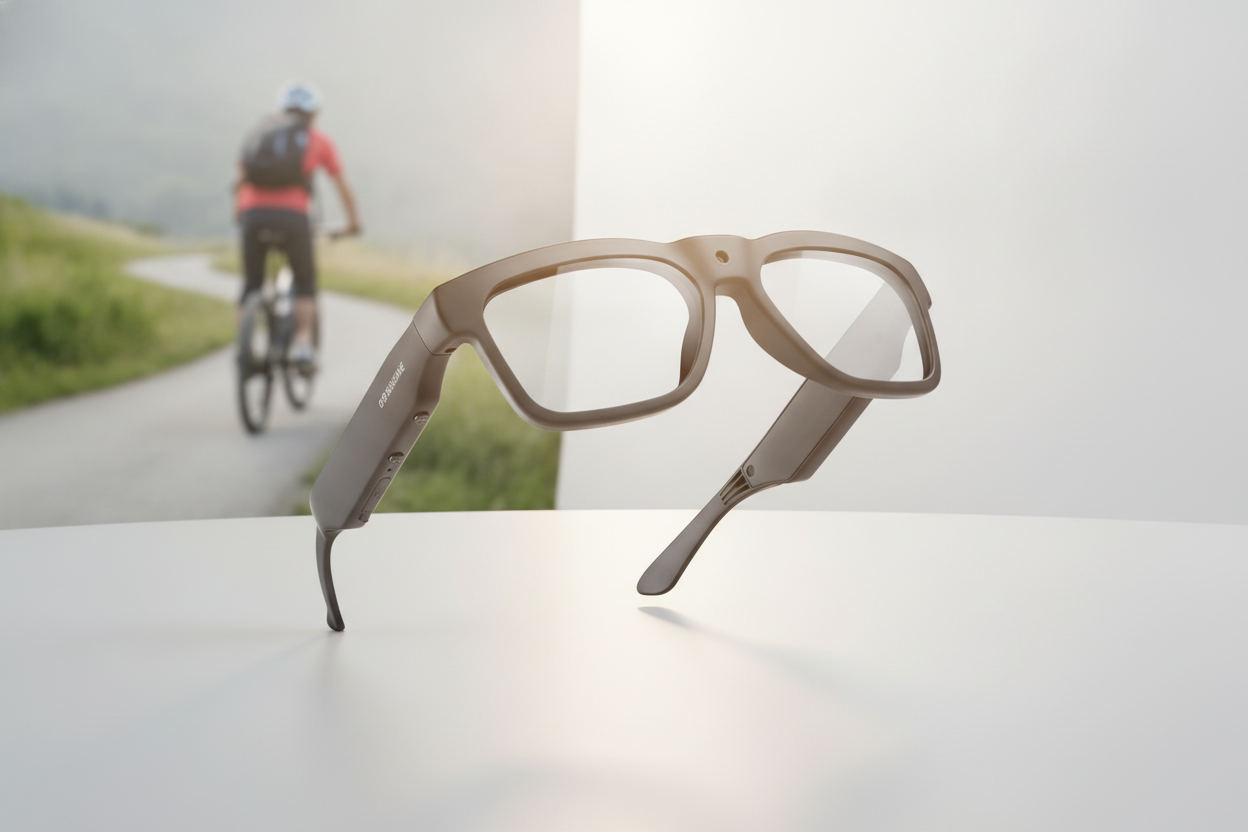
Las mejores gafas con cámara 4K no se definen únicamente por la etiqueta de resolución. Antes de añadir un par al carrito, adapta el modo de vídeo exacto a tu escena, comprueba la estabilización y el campo de visión, y después verifica la autonomía, el calor, el audio, el almacenamiento, la transferencia de archivos, el ajuste, las necesidades de lentes, la garantía y las devoluciones. Una ficha que dice «4K» pero no aclara esos detalles todavía no ha respondido a la pregunta de compra.

Usa la siguiente lista de comprobación para comparar estas gafas según cómo las grabarás realmente, ya sea para montar en bicicleta, esquiar, hacer vlogs, comprar un regalo o capturar ocasionalmente imágenes con las manos libres.
Mira más allá de la etiqueta 4K
4K describe la resolución del vídeo, no la calidad general ni la facilidad de uso de la grabación. Comprueba conjuntamente los modos de vídeo reales, la frecuencia de fotogramas, el campo de visión, los detalles del objetivo, las condiciones de iluminación previstas y el uso previsto de los archivos. Confirma también si una cifra independiente de resolución fotográfica corresponde a imágenes fijas y no a vídeo.
Empieza por localizar en la tabla de especificaciones la entrada correspondiente al modo 4K exacto que piensas utilizar. Comprueba su frecuencia de fotogramas y campo de visión en lugar de dar por sentado que todos los modos etiquetados como 4K funcionan igual. Las instrucciones de funcionamiento de Sony tratan la frecuencia de fotogramas y el ángulo de visión como ajustes independientes, así que compruébalos por separado al comparar productos.

Después, adapta la perspectiva a la escena. Una perspectiva amplia en primera persona puede ser útil cuando quieres que aparezcan tus alrededores y tus manos en la toma, mientras que una perspectiva más estrecha puede funcionar mejor para un sujeto situado directamente delante. Usa grabaciones de muestra cuando estén disponibles, especialmente si te importa lo cerca que parecen los objetos en los bordes del encuadre o cómo responde la cámara en interiores y al anochecer. El 4K por sí solo no confirma que las grabaciones con poca luz sean buenas.
Considera también lo que ocurre después de grabar. Un modo 4K puede requerir más almacenamiento y energía, pero el impacto depende del modelo y del modo de grabación. Si tu teléfono, ordenador, espacio de almacenamiento o rutina de edición no pueden gestionar cómodamente los archivos, un modo de menor resolución puede ser más práctico cuando esté disponible. Para una comparación más amplia, consulta estas diferencias entre 4K y 2K.
Adapta la estabilización y los ajustes de captura a tus grabaciones
Elige la estabilización, la frecuencia de fotogramas y el campo de visión según el movimiento y la perspectiva que esperas, no porque la página del producto use la palabra «4K». La comprobación clave es si la combinación que quieres está documentada para el mismo modo de grabación que piensas utilizar.
Comprueba la estabilización para el movimiento
Para caminar, andar en bicicleta, esquiar u otras actividades en movimiento, considera la estabilización como una comprobación de usabilidad específica del modelo. Busca el tipo exacto de estabilización, si es electrónica o utiliza otro método, y los modos en los que funciona. No des por sentado que las grabaciones en 4K serán fluidas.
Si el anuncio no identifica la estabilización ni proporciona metraje de muestra relevante, marca esa función como no verificada. La técnica de grabación puede reducir los movimientos no deseados, pero no puede demostrar que un modelo concreto de gafas ofrezca un resultado específico. Si los vídeos estables en primera persona son tu prioridad, revisa estos consejos para grabar vídeos POV estables junto con las especificaciones del producto.
Verifica la frecuencia de fotogramas y el campo de visión
Las opciones de frecuencia de fotogramas disponibles pueden depender del formato o modo de grabación seleccionado, así que verifica la combinación exacta de resolución y frecuencia de fotogramas en lugar de fijarte solo en el máximo destacado. Las especificaciones de la Sony FX2 ilustran por qué es necesario comprobar individualmente los modos indicados de una cámara; no establecen las opciones disponibles para estas gafas. El campo de visión es una decisión de perspectiva independiente.
| Configuración | Qué cambia en el metraje | Comprobación para compradores |
|---|---|---|
| Frecuencia de fotogramas | Cómo se captura el movimiento y cómo se adapta el modo de grabación al movimiento que tienes previsto realizar | Confirma que la frecuencia de fotogramas deseada está disponible en la resolución que utilizarás |
| Campo de visión | Cuánto de la escena entra en el encuadre y cómo se percibe el punto de vista | Comprueba la especificación indicada o el metraje de muestra para tu actividad |
Para una escena exterior en movimiento, compara la combinación indicada de estabilización y frecuencia de fotogramas con el campo de visión del producto. Si falta alguna parte de esa combinación, no completes la información basándote en la etiqueta 4K.
Comprueba la duración de la batería, el calor y la carga
Evalúa la duración de la batería en función de tu sesión de grabación real. Compara el tiempo de funcionamiento indicado en el modo 4K y la frecuencia de fotogramas previstos; después, comprueba la carga, los indicadores, el comportamiento del calor y si las gafas se adaptan a tu rutina entre sesiones.
No apliques una promesa genérica de duración a todas las gafas. El rendimiento de la batería puede variar según la resolución, la frecuencia de fotogramas, el patrón de grabación, las funciones inalámbricas, la temperatura y la gestión del calor. Una página de producto que indica un tiempo de funcionamiento sin explicar las condiciones deja sin responder una parte importante de la comparación.
Haz estas preguntas prácticas en la página actual del producto:
- ¿El tiempo de funcionamiento indicado corresponde a una grabación 4K continua o a un patrón de uso diferente?
- ¿Cómo se cargan las gafas y puedes saber cuándo termina la carga o la grabación?
- ¿Tendrás acceso a un cargador o a una fuente de alimentación entre actividades?
- ¿Explica la página qué ocurre cuando las gafas se calientan durante una sesión más larga?
Los productos indicados muestran por qué esta comprobación es importante: las especificaciones ofrecen afirmaciones materialmente distintas sobre la duración de la batería de Edge Pro, Skyshot y Brave. Trátalas como detalles específicos de cada modelo, no como una promesa para toda la colección, y verifica cualquier valor contradictorio en la página activa antes de hacer el pedido. Para planificar actividades relacionadas, consulta esta guía sobre batería y almacenamiento de las gafas con cámara.
Verifica el audio, el almacenamiento y la transferencia de archivos
Una cámara solo es útil si captura el sonido que necesitas, almacena los archivos y permite que tu teléfono u ordenador acceda a ellos. Verifica todo el recorrido, desde el micrófono y el modo de grabación hasta el almacenamiento, el método de conexión, el acceso a los archivos y la edición, no solo la presencia de Bluetooth, Wi-Fi o una cámara.
Confirma la captura y el control del audio
Confirma que la grabación de audio funciona en el modo de vídeo que pretendes utilizar. Los usuarios que estén al aire libre también deben comprobar qué indica la ficha sobre la exposición al viento y los controles de audio; estas comprobaciones no garantizan la calidad del sonido.
- Verifica que el dispositivo tenga un micrófono integrado o admita uno de otro modo.
- Confirma que el audio se graba en los modos de vídeo deseados.
- Comprueba si la ficha aborda la exposición al viento al practicar ciclismo, esquí o caminar al aire libre.
- Busca información sobre la monitorización durante la reproducción, el silencio u otros controles y limitaciones de audio.
Mantén separadas las funciones de audio de oído abierto del audio grabado. Un par puede ofrecer una sin demostrar la otra.
Comprueba el almacenamiento y la transferencia antes de comprar
| Paso del flujo de trabajo | Especificación que debes verificar | Por qué es importante |
|---|---|---|
| Almacenamiento | Método de almacenamiento integrado, extraíble u otro; capacidad indicada y detalles sobre el espacio utilizable | Determina cuánto puedes grabar antes de mover los archivos |
| Transferencia | Aplicación, cable, conexión inalámbrica u otro método de acceso necesarios | Muestra cómo salen las imágenes grabadas de las gafas y llegan a tu teléfono u ordenador |
| Acceso a los archivos | Dispositivos compatibles, ubicación de los archivos y flujo de trabajo de edición | Evita una compra que graba correctamente, pero no se adapta a tu rutina |
Si la ficha del producto no indica el almacenamiento, el método de transferencia, la aplicación o el cable necesarios, o la compatibilidad con dispositivos, considera que el flujo de trabajo no está verificado. El tamaño exacto de los archivos y las velocidades de transferencia deben consultarse en la documentación actual del producto, no suponerse por el hecho de que sea 4K. Planifica la transferencia antes de comprar: graba, conecta, localiza los archivos, pásalos al dispositivo en el que editas y confirma que tu software habitual puede abrirlos.
Elige gafas con cámara 4K según tu forma de grabar
Empieza por la actividad, las condiciones de uso y el flujo de trabajo que necesitas, y después utiliza la colección de gafas con cámara 4K como punto de partida. La colección no demuestra que todos los modelos compartan las mismas condiciones de estabilización, batería, audio, almacenamiento, lentes, garantía o devoluciones.
Adapta el ajuste y las opciones de lentes a la escena
La comodidad y la compatibilidad de los lentes pueden determinar si usas las gafas después de comprarlas. Verifica el ajuste de la montura, la duración de uso prevista, la compatibilidad con lentes graduados, las opciones de insertos o reemplazo de lentes, el tinte o la polarización y las condiciones de visibilidad de la escena.
- Comprueba si la montura se adapta al destinatario o usuario durante el tiempo que dura una salida habitual.
- Pregunta si ese modelo admite lentes graduados, insertos o lentes intercambiables.
- Adapta los detalles del tinte o la polarización al entorno sin considerar que la etiqueta de una lente demuestra el rendimiento de la cámara.
- Confirma cómo se espera que funcionen las gafas en condiciones de mucha luz, luz cambiante, interiores o nieve reflectante.
Si la página del producto no responde claramente a una pregunta sobre la graduación o las lentes, contacta con el vendedor antes de hacer el pedido. No des por hecho que una montura de forma conocida admite lentes de repuesto.
Compara las opciones anunciadas según el caso de uso
Usa los ejemplos siguientes para decidir qué página de producto merece una revisión más detallada. Son opciones sin clasificar, no una prueba de que un modelo haya superado la lista de comprobación completa.
| Situación del comprador | Opción pertinente anunciada | Motivo verificado para inspeccionarlas |
|---|---|---|
| Deportes al aire libre o ciclismo | Edge Pro | Anunciadas para grabación en exteriores; revisa sus datos vigentes sobre vídeo, batería, almacenamiento, audio y lentes |
| Deportes al aire libre o ciclismo | Brave | Anunciadas para uso POV en exteriores; revisa sus datos vigentes sobre autonomía, almacenamiento, montura, lentes y condiciones meteorológicas |
| Esquí o snowboard | Skyshot | Anunciadas para esquí y snowboard, con detalles sobre gran angular, antivaho, Wi-Fi y USB-C; verifica la página vigente |
Para cada opción, verifica por separado la estabilización, el modo de grabación exacto, el almacenamiento y el proceso de transferencia, la comodidad, la compatibilidad con la graduación, la garantía y las devoluciones. Si hay contradicciones entre las secciones de la página del producto -por ejemplo, sobre el campo de visión o la autonomía-, detente hasta que la especificación vigente esté clara.
Verifica la protección de compra antes de finalizar la compra
Lee la garantía y la política de devoluciones vigentes antes de hacer el pedido, especialmente cuando no tengas claro si serán cómodas, si las lentes encajarán o si serán compatibles con tu flujo de trabajo. Confirma que la protección cubra el problema que más te preocupa y que el plazo, el estado requerido, las exclusiones, la responsabilidad del envío y el proceso de notificación se ajusten a tu situación.
Lee las condiciones de la garantía
Comprueba el período de cobertura, los componentes cubiertos, las exclusiones y el proceso de reclamación para problemas relacionados con la cámara, la montura, la batería o los accesorios. La duración indicada de la garantía, por sí sola, no explica qué ocurre si el producto resulta incómodo, es incompatible con tus lentes o no se adapta a tu flujo de trabajo. Guarda el anuncio del producto y la página de políticas que utilizaste para decidir.
Si el texto vigente no aborda claramente el problema probable, considera que la cobertura no está verificada y contáctanos antes de finalizar la compra. Podemos aclarar la información de asistencia vigente en lugar de pedirte que te bases en una suposición general del comercio electrónico.
Comprueba las condiciones de devolución antes de hacer el pedido
Verifica el plazo de devolución, el estado requerido, las exclusiones, cualquier autorización o documentación necesaria y quién se hace cargo del envío de devolución. Esto es especialmente importante en el caso de regalos, dudas sobre la graduación, problemas de comodidad y productos cuyo proceso de transferencia no puedes probar hasta recibirlos.
Guarda una copia del anuncio, los detalles del pedido y las condiciones de la política. Cuando lleguen las gafas, compara el modelo recibido y las características indicadas con la información que influyó en tu compra. Las condiciones exactas de devolución pueden cambiar, así que confirma la página de políticas vigente en lugar de basarte en un resumen del anuncio del producto.
Ejecuta la lista de comprobación final antes de comprar
Sigue esta secuencia antes de añadir unas gafas al carrito. Si falta una especificación o política fundamental, detente y verifícala en lugar de considerar la etiqueta de resolución como prueba de que el producto es adecuado.
- Define la escena de grabación. Anota si grabarás ciclismo, esquí, eventos en interiores, vlogs, regalos o momentos cotidianos, junto con el movimiento y el punto de vista que importan.
- Verifica la combinación de captura. Confirma el modo 4K, la frecuencia de fotogramas disponible, el campo de visión y la estabilización para ese modo exacto.
- Comprueba las condiciones de autonomía. Compara la autonomía indicada, el método de carga, el comportamiento térmico, las condiciones de temperatura o de la sesión y tu acceso a una recarga.
- Define el flujo de trabajo de los archivos. Confirma la grabación de audio, el almacenamiento, el método de transferencia, la aplicación o el cable necesarios, el teléfono o el ordenador compatibles y el acceso a los archivos.
- Confirma el ajuste y las necesidades de lentes. Comprueba la comodidad, el tiempo de uso, la compatibilidad con lentes graduadas o de repuesto, el tinte, la polarización y los requisitos de visibilidad.
- Revisa la protección de compra. Lee las condiciones vigentes de garantía y devolución, incluida la cobertura, los plazos, el estado, las exclusiones, el envío y los pasos para informar de un problema.
- Compara la página elegida con la colección. Después de identificar tus requisitos imprescindibles, explora la colección y abre la página del producto correspondiente. Compra solo cuando los detalles específicos del modelo estén suficientemente verificados.
Preguntas frecuentes
Usa estas respuestas para resolver las dudas habituales de compra sin considerar una etiqueta de resolución como prueba de adecuación, rendimiento, compatibilidad o valor. Cuando falte una especificación o política, verifícala en la página actual del producto o de la tienda antes de hacer el pedido.
¿Cuándo merece la pena el almacenamiento y el consumo de batería adicionales del 4K?
El 4K puede tener sentido cuando necesitas más detalle o recortar la imagen y tu flujo de trabajo de almacenamiento, transferencia, edición y autonomía es compatible con el modo elegido. De lo contrario, una opción de menor resolución puede ser más práctica, si está disponible.
¿Estas gafas funcionan bien para grabar en interiores o con poca luz?
No uses el 4K como prueba de un buen rendimiento con poca luz. Busca vídeos de muestra específicos del modelo o información declarada sobre condiciones similares, y comprueba el proceso de devolución si las pruebas son limitadas.
¿Se pueden usar lentes graduadas?
La compatibilidad varía según la montura y el diseño de las lentes. Comprueba los insertos, las lentes de repuesto u otra opción compatible en la página del producto o con el vendedor; no deduzcas la compatibilidad por el aspecto.
¿Necesitaré un teléfono o una aplicación para transferir vídeos?
Los requisitos varían. Confirma la aplicación exacta, el cable o la conexión, los dispositivos compatibles, la ubicación de los archivos y el flujo de trabajo de edición; el Wi-Fi o el Bluetooth por sí solos no demuestran que se puedan recuperar los vídeos.
¿Qué deben confirmar quienes compran regalos?
Comprueba la actividad del destinatario, la comodidad de la montura, las necesidades de lentes, los dispositivos de transferencia y el entorno de grabación. Si desconoces esas preferencias, revisa el plazo de devolución vigente, el estado, las exclusiones y quién asume los gastos de envío antes de hacer el pedido.



Deja un comentario
Este sitio está protegido por hCaptcha y se aplican la Política de privacidad de hCaptcha y los Términos del servicio.