
























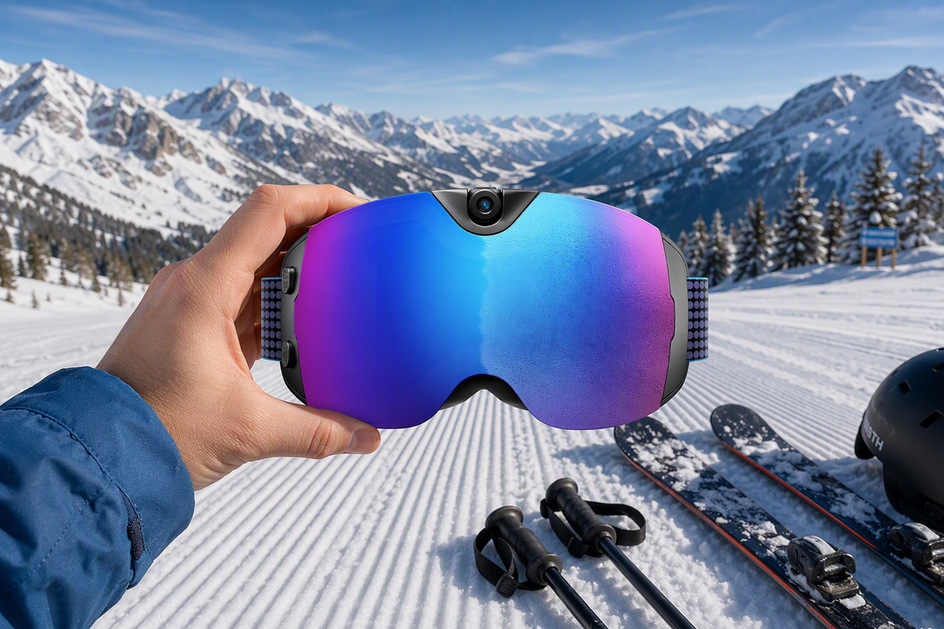
Offline camera ski goggles with onboard recording and local storage can generally capture and save video without internet, Wi-Fi, or cell service. The specific model still needs enough battery, available storage, and a way to start recording without opening an app. Internet and phone connections mainly affect what happens after a clip is saved, such as previewing, transferring, or sharing it. This guide explains what works on the mountain and what can wait until later.
Can Camera Ski Goggles Record Without Internet?
Yes, with a few conditions. Most camera ski goggles record and save footage locally, so internet access and cell service are not needed for basic recording. The goggles write video to onboard storage much like a standalone action camera, whether you're at a resort with full bars or in a canyon with none.

Three things matter more than signal strength: battery power, available storage, and a way to start and stop recording—usually a physical button. If any of these fails, you can lose the clip regardless of your internet connection. Losing cell service during a run does not erase footage already saved to the goggles.
The model itself is the key variable. Some camera ski goggles require a companion app to start recording or change settings. That can make phone-free use less practical, even when the video is saved locally. Before relying on offline camera ski goggles, confirm that the exact model has local storage and a control for recording on the goggles. Our guide to smart glasses offline basics explains app requirements for smart eyewear in more detail.
What Works Offline—and What Requires a Connection?
Camera ski goggles are easier to understand as a series of separate tasks. Recording and local saving happen on the goggles. A nearby phone connection is a separate step, and internet access is a third step that usually comes later.
That nearby connection is often mislabeled. Wi-Fi does not always mean internet. Phones and cameras can use a local Wi-Fi connection without internet to connect directly over a short-range link. If the goggles and app support this, you can preview or copy a clip to your phone at the lift line with zero bars. The table below shows what each step needs.
| Task | Works Without Internet | Requires or May Require a Connection |
|---|---|---|
| Recording a run | Yes, with power and storage | — |
| Saving the clip to local storage | Yes, if storage space is available | — |
| Direct phone-to-goggle Wi-Fi link | Possible, depending on the model | Depends on app support |
| Previewing or downloading footage | Sometimes, over a local link | May need the companion app |
| Cloud backup | No | Needs internet |
| Posting or sharing online | No | Needs internet |
Storage type, capacity, and transfer method vary by model. Check your goggles' documentation before assuming a feature is included. Our comparison of camera glasses storage options explains built-in memory and microSD compatibility so you can plan for available space.
Do You Need a Phone on the Mountain?
With supported offline camera ski goggles, a phone is not needed to record as long as the goggles have a physical capture control and local storage. You can leave your phone in a jacket pocket or at the lodge and still return with saved clips at the end of the day.
A phone is useful, but not required, for previewing footage on a larger screen, changing camera settings in an app, and transferring files off the goggles. None of these tasks automatically requires internet. If the model supports a local Wi-Fi connection, your phone can preview and transfer clips without cell service. Internet matters when you want to back up footage to the cloud or post it online. If you plan to move clips off the goggles later, our walkthrough on how to transfer ski goggle videos covers practical steps for protecting your files.

How to Prepare Camera Goggles Before Leaving Service
Prepare the goggles before you enter an area with weak or no signal. Start with power and work through these five steps. A tested setup is easier to manage than troubleshooting on the mountain.
- Charge the goggles fully. Battery life, not signal, is the main limit on offline recording.
- Confirm that local storage is available and not full from a previous trip.
- Record and review a short test clip while you still have service. This can reveal a storage or control problem while it is easy to fix.
- Pair your phone in advance only if you plan to preview settings or transfer files during the day. Skip this step if you are leaving the phone behind.
- Plan to back up files and share them later. Both tasks can wait until you are back on Wi-Fi or cell service.
This setup helps protect your footage even if you never see a signal bar all day.
When the OHO SUNSHINE 4K Camera Smart Ski Goggles Fit This Offline Use Case
Our OHO SUNSHINE 4K Camera Smart Ski Goggles suit skiers and snowboarders who want to capture full runs without depending on a phone or internet connection during the ride. They record in 4K with a 140° wide-angle lens, so a fast descent through trees or a terrain park line can be captured in one continuous local recording instead of a series of phone clips.
They also include an anti-fog lens and UV400 protection for bright, high-glare days on the snow, plus USB-C charging for pre-trip charging. Wi-Fi is built in, but phone preview and file transfer depend on the current product documentation and app workflow. Check those details and the available onboard storage before your first trip.
If you want hands-free, offline recording on the mountain, see the OHO SUNSHINE camera ski goggles for full specs and current availability.
FAQs
Can camera ski goggles record without Wi-Fi?
Yes, with the right setup. Local recording and saving can work without Wi-Fi or internet when the goggles have onboard recording, local storage, enough battery power, and a control such as a button. Exact behavior depends on the model, so check its documentation.
Do smart ski goggles work without cell service?
Cell service is not required to record or save footage locally. It matters for internet-based features such as cloud backup and online sharing, which also depend on the model and any connected app or service.
Do I need my phone to record with camera goggles?
Usually not, if the goggles have a physical capture control that starts and stops recording without an app. A phone is useful for previewing footage, changing settings, or transferring files, but those are separate tasks.
Can you transfer ski-goggle videos without internet?
Sometimes. A direct local Wi-Fi or cable connection between the goggles and phone can transfer files without internet when the model and app support that connection type. The exact method varies, so confirm it in the product documentation. Posting or backing up footage online still requires an internet connection.




Zostaw komentarz
Ta strona jest chroniona przez hCaptcha i obowiązują na niej Polityka prywatności i Warunki korzystania z usługi serwisu hCaptcha.