
























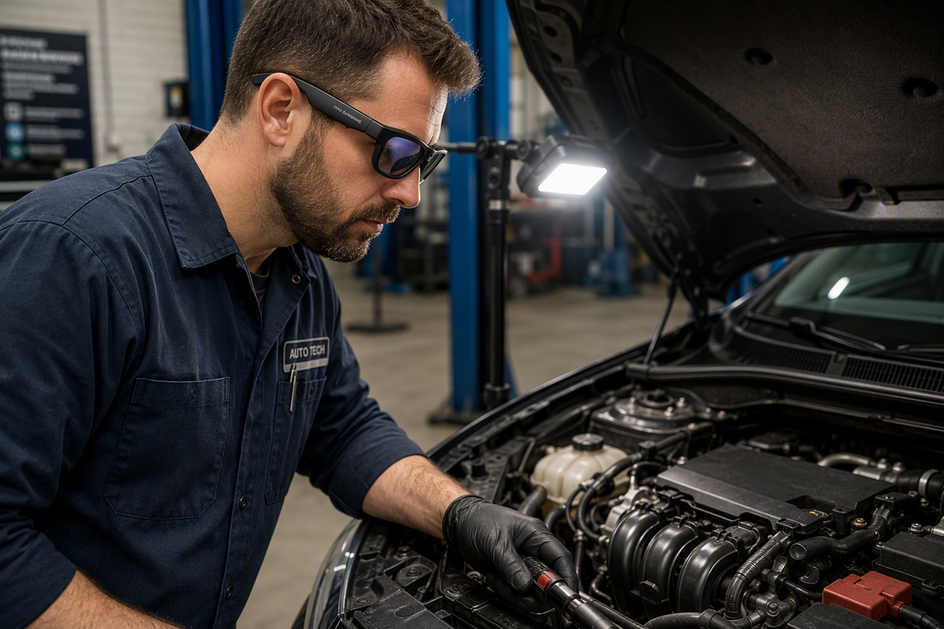
Camera glasses work best for auto mechanics when the job is a short, first-person clip of something both hands are busy holding, like a leaking hose deep in a crowded engine bay. Eyeglasses with a camera in them let you show a service desk or customer exactly what you see without setting down a wrench or juggling a phone. They don't replace required eye protection, inspection mirrors, scan tools, or a proper physical inspection, and how useful the footage turns out to be depends far more on framing, lighting, lens care, and file handoff than on the camera specs on the box.
When Camera Glasses Help—and When They Do Not
Camera glasses are a documentation tool, not a diagnostic instrument, so the right question is whether a short recorded viewpoint actually helps the next person understand the job. They fit best when both your hands are occupied and someone away from the vehicle needs to see your exact perspective.

- Useful: Short, visual, first-person clips where the recipient needs your point of view, such as pointing out a cracked hose or a leaking gasket while you keep working.
- Limited: Dim, reflective, or tightly packed engine bays where you haven't yet tested framing, glare, or lighting with that specific model.
- Not a replacement: Required eye and face protection, inspection mirrors, scan tools, or safe vehicle-handling procedures. Federal eye and face protection rules require appropriate protection whenever a hazard is present, and a camera feature does not change that requirement.
If you're testing whether smart glasses with camera hardware fit your shop, start with one representative clip and confirm it reaches the right recipient before trusting the setup for daily work.
What to Check Before Choosing Camera Glasses
Camera placement, lighting behavior, and file transfer matter more than headline resolution when choosing eyeglasses with a camera in them for a real shift. Verify these in order: what the lens actually sees, how it handles shop lighting, and whether the file can reach the service desk.

Camera Viewpoint and Image Needs
- Check where the camera sits relative to your eyes and what stays in frame when you look down into a bay.
- Test with a real connector, hose, label, or leak area instead of a tabletop demo; a target that looks clear on a bench can vanish once your head tilts.
- Confirm the target stays visible during normal head movement, and check glare, focus, and low-light behavior before relying on it for glasses with video camera work in a dim bay.
Controls, Comfort, and Lens Protection
- Confirm you can start and stop recording without reaching for a phone, and that you can tell recording is active from an indicator light or sound.
- Check weight, fit, prescription compatibility, and whether the frame stays stable through repeated bending and looking down.
- Verify the lens material, the manufacturer's cleaning instructions, and whether the eyewear actually meets your shop's protective requirements. Confirming this against the applicable protective-eyewear standard is a verification step, not something a camera feature can prove on its own.
Files and Shop Compatibility
- Verify storage capacity, battery behavior, file format, and whether the device needs an app, cable, OTG adapter, or network connection to move a clip off the glasses.
- Test the complete route into your actual work-order or customer-communication system before assuming it will work.
- Pick a file-naming convention before your first real clip, such as work-order number, vehicle or bay, and component, so the recipient can identify it later.
How to Record an Engine-Bay Diagnostic Clip
A readable engine-bay clip comes from picking one target, lighting it correctly, and keeping your viewpoint steady rather than chasing more resolution.
- Identify the exact component or condition the recipient needs to see before you start recording; don't try to capture the whole bay.
- Position an LED work light from a different angle than the camera so labels, edges, or wet spots stay readable without a hot reflection washing them out.
- Hold your head and shoulders steady, show the target long enough to register, and describe what's visible in a few plain words rather than narrating a full repair.
- Play the clip back from the recipient's perspective before you rely on that setup again; if the target isn't identifiable, adjust the light or angle and try once more.
!Mechanic wearing camera glasses while inspecting an engine bay under an LED work light
How to Record a Customer Walkthrough
A customer walkthrough clip works when it follows a simple order: where, what, why it matters, and what happens next. Keep it short enough that a customer can watch it once and understand the decision in front of them.
- Follow your shop's disclosure and recording policy before you capture a customer, coworker, or private conversation.
- Show the vehicle area first, then the visible condition, so the viewer has context before you explain anything.
- State the practical consequence in plain language a non-technician can follow, avoiding shop shorthand or jargon.
- End with the specific next action, such as an inspection, an estimate, or an approval you're waiting on, and keep the frame focused on the work-order issue rather than unrelated faces or background conversation.
A Camera-Glasses Workflow from Bay to Service Desk
One repeatable sequence turns a recorded clip into something the service desk can actually use: prepare, light and frame, record, protect, name, transfer, and confirm. Exact cleaning and transfer steps still depend on your specific model and shop system, so treat the manual as the final word on those details.
Prepare the Glasses and Work Area
- Check the lens surface, charge or power state, available storage, and the recording indicator before you start.
- Position the LED work light so the target is visible without a bright reflection sitting directly over it.
- Choose your target and the intended recipient before you press record.
Record and Protect the Clip
- Open with a brief orientation, hold your head and shoulders steady, and show the target long enough for someone else to identify it.
- Stop recording before moving to an unrelated area, and review the clip on the spot if your setup allows it.
- Brush off visible grit before cleaning, use the manual-approved cloth or method, and return the glasses to a case rather than a pocket or toolbox.
Name, Transfer, and Hand Off
- Use a consistent file name, such as work-order number, vehicle or bay, component, and clip number.
- Transfer the file through the cable, adapter, app, or network path documented for your model and shop system.
- Confirm the file opens at the destination, then tell the service desk what the clip shows and what decision it supports.
Our secure work documentation guide covers how to test access, retention, and pilot approval before rolling this workflow out shop-wide.
Which OHO SUNSHINE Camera Glasses Fit a Mechanic's Workflow?
Between our two camera-equipped models, the choice comes down to how many recording controls you want and how long your clips typically run, not resolution alone.
| Model | Supplied recording/control facts | Best-supported scenario | Still needs testing |
|---|---|---|---|
| Edge Pro camera glasses | 4K/30 fps video, voice/button/app controls, built-in microphone, storage options up to 256GB | Technicians who want multiple ways to start recording and more storage room for a full shift | Camera framing in your bay, low-light behavior, and your specific transfer path |
| Brave camera glasses | 4K/30 fps video, physical button control, built-in SD-card storage, polarized UV400 lenses, about 30 minutes of battery life | Brief inspection or walkthrough clips for technicians who prefer a single physical button and polarized, sunglasses-style lenses | Charging discipline around the 30-minute battery window, plus framing and file transfer in your shop |
Choose Edge Pro when you expect longer or more frequent clips and want control flexibility; consider Brave when your clips are brief and you'd rather work with polarized video camera sunglasses and a single button. Either 4K camera glasses option still needs a pilot clip in your actual bay before you rely on it for daily documentation, and our work recording glasses collection is a reasonable place to compare options once you know which factor matters more to you.
What to Verify Before Relying on Camera Glasses at Work
Before making camera glasses part of your regular workflow, run one representative pilot clip through four pass/fail checks rather than assuming the device is ready.
- Image pass: The intended component is identifiable in your actual engine bay, under your typical lighting, with acceptable glare and head movement.
- Device pass: Controls, the recording indicator, charging routine, storage, lens-care process, and physical fit all work across a real shift.
- Workflow pass: The file can be named, transferred, opened, attached to the correct work order, and understood by whoever receives it.
- Policy pass: The model's protective status, your shop's PPE requirements, customer-recording policy, and approved storage path are all aligned.
If any gate fails, fix that specific issue and re-test rather than rolling the glasses out shop-wide on an unresolved gap.
Conclusion
Camera glasses fit hands-free documentation once you've proven the viewpoint, lighting, and handoff path work in your actual shop. Resolution and product labels aren't enough on their own. We recommend running one representative clip through your approved capture-to-handoff workflow, and comparing Edge Pro or Brave against that same test, before adopting camera glasses more broadly.
FAQs
Can I Record a Customer or Coworker Without Asking?
Follow your shop's disclosure and consent policy before recording a customer or coworker; this varies by workplace and situation, so there's no universal rule to rely on. The next action is to define, in writing, who may record, where clips can be stored, and when recording must stop.
How Long Should an Inspection Clip Stay on the Glasses or Phone?
Keep the source file until you've confirmed it reached the approved destination and is attached to the correct job. After that, follow your shop's retention and deletion rules, and assign one person as the owner of that process so files don't pile up on personal devices.
Will Camera-Glasses Files Work With Every Work-Order System?
Don't assume universal compatibility. Confirm the file format, transfer method, upload size limit, and customer-sharing behavior against your actual shop system, then test one complete upload before depending on it.
Does 4K Guarantee a Useful Engine-Bay Inspection Clip?
No. Resolution describes recording quality, not whether the clip is readable. A pilot clip should check framing, focus, lighting, audio, and whether the recipient can identify the component without extra explanation from you.


Commenta
Questo sito è protetto da hCaptcha e applica le Norme sulla privacy e i Termini di servizio di hCaptcha.