
























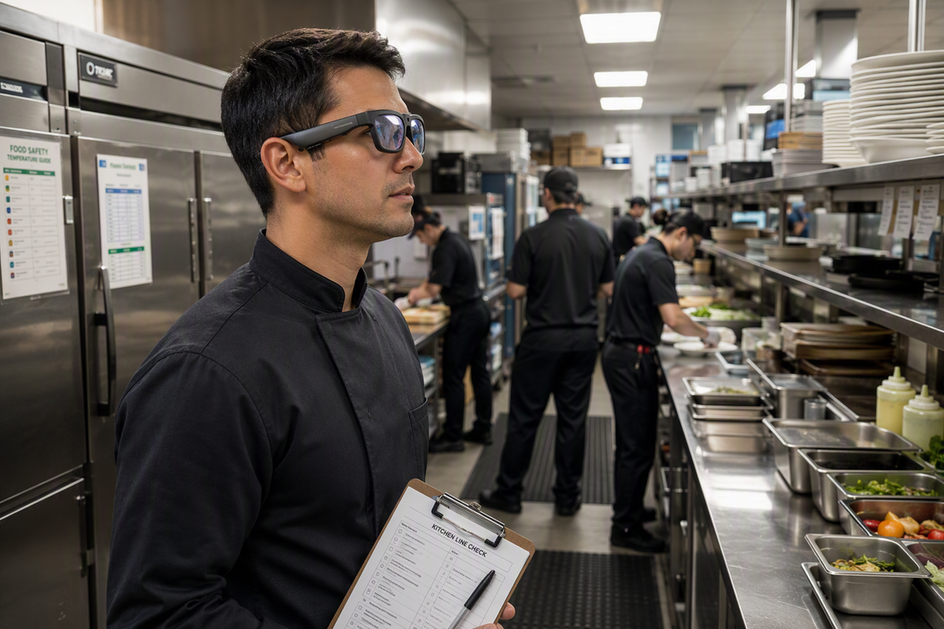
AI camera glasses can support a commercial kitchen line check or training session, but only as supplementary documentation, not proof of compliance. A first-person clip can show what the wearer saw, where, and when, inside an approved internal workflow. It cannot replace the written audit, required controls, or a health inspector's judgment.
Whether the footage holds up later depends on coverage, continuity, and review, not on the recording label alone. This guide sets a recording-reliability standard first, then matches camera features to documented kitchen tasks so a manager can select the right tool instead of guessing.
Kitchen Audit Standards
A recording earns a place in an audit record only after it passes a minimum reliability test. Resolution, Bluetooth range, or an "AI" label on the box do not establish that a clip meets any inspection standard on their own.

What a Recording Can Support
A hands-free clip can document an observed condition, a training step, or a corrective-action moment from the wearer's point of view. It can also preserve context for an internal self-audit that a manager reviews later, such as how a cook handled a temperature check or how a line worker moved between stations. That value comes from pairing the clip with the written record, not from the footage standing alone.
The written audit, the food-safety control log, and the corrective-action record stay the controlling documents. Retail food safety inspection procedures are built on the FDA Food Code and apply risk-based inspection methods tied to foodborne-illness risk factors and HACCP principles, none of which a private video clip can substitute for. The Food Code framework is a model adopted state by state, so the applicable local rules, not the recording device, decide what a formal inspection accepts.
What to Verify Before Relying on Footage
Before a manager treats a clip as useful evidence for a self-audit or training file, it should pass these checks:
- The relevant area and action stay visible while the wearer moves through prep, storage, or service.
- The clip has a clear start and stop, with no unexplained gaps in the walkthrough.
- The file has an identifiable name, date, or session tag that a reviewer can trace back to the shift.
- Audio or visual clarity is good enough for the intended review, without excessive glare, steam, or motion blur.
- The file moves through a defined, access-controlled storage and transfer path rather than a personal device or app.
- A trained reviewer, not the footage itself, interprets the clip and links it to the written observation.
- An escalation path exists for incomplete, ambiguous, or hazard-suggesting footage.
A clip that fails any of these checks should not close a corrective action or stand in for a health inspector's determination. When footage is incomplete or shows a possible hazard, escalate it through the kitchen's existing food-safety procedure and get human review before acting on it.
AI Glasses Integration
A workable deployment starts with an approved purpose and ends with a reviewed, retained, or deleted file. The three selected OHO SUNSHINE models then map to different parts of that job depending on whether the task needs video, audio, or both.

A Controlled Hands-Free Workflow
- Before recording, define the purpose, the exact area, who will be present, and who approved the session. Decide whether notice or consent is needed, who owns retention, and who gets escalated to if something goes wrong.
- During recording, confirm the glasses fit correctly, the recording indicator is active, and the session stays within its planned time limit. Keep the written audit process running alongside the recording rather than treating the camera as a replacement for it.
- After recording, transfer the file through the approved path, label it with the session and area, and restrict access to reviewers who need it. Review the clip against the written record, then retain, delete, or escalate it under the kitchen's policy.
Privacy, Consent, and Inspection Boundaries
A workplace recording policy should state where and why recording happens, and who can access or retain the file. Employers handling audio or video at work are generally advised to give clear notice, document a legitimate business reason, define the recording areas, and set a retention schedule, since state rules on audio consent vary. A single national rule does not exist, so a manager should confirm state-specific requirements and the site's own inspection procedures before recording staff.
Customer-facing areas and unintended bystanders belong in this same access-control discussion. Do not record staff, customers, visitors, or contractors until the location's notice, consent, and inspection procedures are approved for the intended purpose, and stop and escalate immediately if a session captures an unintended person or sensitive event outside that purpose.
Matching the Three Selected Models to the Job
| Model | Documented fit for the kitchen task | Boundary before deployment |
|---|---|---|
| Edge Pro | 4K/30 fps video, 24MP photos, a built-in microphone, voice control, Bluetooth 5.3, and a stated 1.5-20 hour battery range make it the broadest documented option for a longer walkthrough. | Test the actual recording mode and battery drain in your kitchen before assuming full-shift coverage. |
| Brave | 4K/30 fps video, 24MP photos, a microphone, simple button control, and built-in storage suit short, deliberately bounded clips. | Its stated 30-minute battery life is a hard planning limit; plan several short sessions instead of one continuous walkthrough. |
| GlobeEar | Bluetooth audio, AI Chat translation, a microphone, voice control, and a stated 10-hour battery working time support hands-free communication and language support. | No camera specification is documented for this model; do not select it for video-based line-check recording. |
Choose the Edge Pro camera glasses when a self-audit or training pilot needs the documented camera plus hands-free voice control across a longer service window, then confirm actual runtime on the line before relying on it. The Brave camera glasses fit a team that wants a simple button-started clip and local storage for a short, specific observation, such as one prep step or one corrective-action moment. If the task is communication or menu translation rather than video documentation, the GlobeEar translation glasses provide that hands-free audio support without being treated as camera-based audit evidence.
For teams building a broader documentation habit, our work recording collection groups models by task to help you compare camera and audio features. In addition, our guide on secure work documentation details access protocols, pilot planning, and file retention beyond what a single kitchen workflow requires.
Conclusion
We recommend piloting a single model only after your approved recording-reliability checks, privacy controls, and human review steps are in place. If any requirement is unmet, restrict use to internal training documentation or defer deployment until your procedures are established. If you are ready to evaluate hands-free documentation, we suggest starting with a single prep station pilot alongside your standard written audit logs to confirm line visibility and compliance workflow before expanding.
FAQs
Can a restaurant share kitchen-audit footage with a health inspector?
Sharing depends on the applicable inspection program and the restaurant's own record policy, not on the fact that a clip exists. Confirm with the inspecting authority or program contact whether they accept supplementary video before treating any clip as part of a formal submission, and keep the file's labeling and chain of custody intact if you do share it.
What should a manager do if a clip captures a customer or visitor?
Pause any distribution of the file immediately and restrict access to it. Document what happened, then follow the location's approved privacy, retention, and deletion process, and get local legal or HR guidance if the recording raises a consent question. The priority is handling that specific incident, not rewriting the whole recording policy on the spot.
What context should stay with a training or audit clip?
Keep the defined purpose, the line or area recorded, a date and session identifier if the file system supports one, the wearer's name, the observation or task shown, the reviewer, and any resulting corrective-action status. Treat this as a set of fields to test in your own record system rather than a universal legal requirement, since retention and access rules differ by state and by workplace policy.


Commenta
Questo sito è protetto da hCaptcha e applica le Norme sulla privacy e i Termini di servizio di hCaptcha.