
























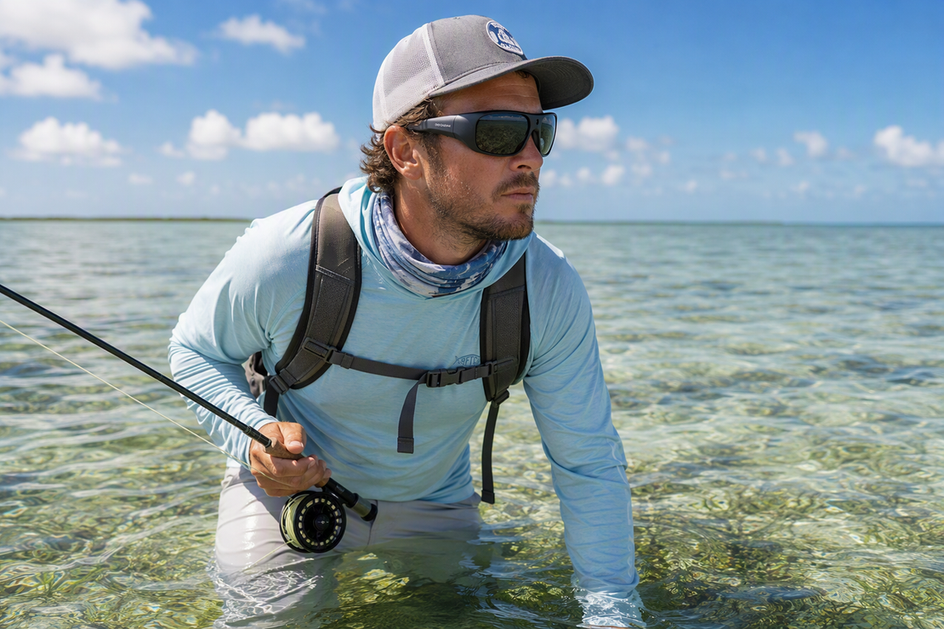
Polarized lenses cut the reflected glare that hides fish and structure in shallow water, but that visual improvement does not automatically transfer to what a camera records. The wearer's eye and a camera lens sit in different positions and read light differently, so a clear view through the glasses can still produce a washed-out or dark clip. The real fix is to pick a lens tint suited to your light conditions, then test the exact glasses-and-camera setup before you trust it on the water.
What Polarization Changes for Shallow-Water Sight Fishing
Polarized lenses work by blocking light that has bounced off a flat surface like water and become aligned in one direction. That single change cuts the bright sparkle on the surface so your eyes can see past it into the water column. It does not guarantee you will spot every fish or piece of structure, and it does not tell you anything about a camera pointed through or beside the same lens.

That gap between what you see and what gets recorded is the central issue for any camera glasses or smart glasses with camera built for sight fishing. A sunglass lens sits in front of your eyes; a camera lens usually sits in a different spot on the frame, often at a slightly different angle to the water's glare. The two optical paths can behave differently even when the tint looks perfect to you.
Two actions resolve the uncertainty. First, choose a tint that fits your typical light rather than assuming darker is always better. Second, run a short recorded test with your exact setup before relying on it during a trip. Both are covered below.
Amber vs. Gray: Choose the Tint by Light and Viewing Priority
Start with gray in bright, direct sun if accurate color and glare control matter most, and treat amber as a conditional option worth testing in overcast or shifting light. Neither tint is proven best for every lens, so the table below is a starting point, not a verdict.

| Scene/Light | Starting Tint | Viewing Priority | Verify Before Choosing |
|---|---|---|---|
| Bright direct sun | Gray | Neutral color, glare control | UV coverage, distortion-free lens, visible-light screening |
| Overcast or changing light | Amber (test candidate) | Structure contrast | Compare against gray in the same scene; watch for over-darkening |
| Mixed or variable inshore light | Compare both | Consistent visibility as light shifts | Short test clips in each tint before committing |
The American Optometric Association recommends sunglasses that block 100% of UVA and UVB light, screen 75 to 90% of visible light, and use lenses that are gray for accurate color recognition and free of distortion. That guidance makes gray the conservative default when color fidelity matters, but it does not rule out amber. If you fish mostly in low or changing light, compare the exact lens options side by side rather than choosing by name alone, and confirm the specific pair meets those UV and clarity standards before you rely on either tint.
How Polarized Lenses Interact With 4K Camera Sensors
The camera's full optical path, not the word "polarized" on the box, decides whether footage stays usable. A camera has to look through the same filtered light as your eyes, and the relationship between the lens's polarizing axis and the camera's own optics determines how much glare actually gets removed on video.
External Polarizer vs. On-Chip Polarization
A sunglass lens is an external filter sitting in front of the camera's optics, and it behaves differently than a sensor built for polarization. Some specialized industrial sensors include a multi-directional on-chip polarizer formed directly on the photodiode, letting the sensor itself measure polarized light in one shot. Ordinary 4K camera glasses do not typically document this kind of sensor, so treat an external polarized lens and a polarization-aware sensor as two separate things until the exact model's specification sheet says otherwise.
Why 4K Resolution Does Not Settle Optical Quality
Resolution describes how many pixels make up the image, not whether glare gets rejected or the scene stays sharp. Rejecting reflected glare depends on lining up the polarizing filter's axis correctly. Machine vision guidance notes that maximum glare rejection in a two-filter system requires the polarizing filters to be properly aligned, and misalignment can leave reflections in the frame even with a polarized lens in place. Shutter design matters too: sensors with a rolling shutter can distort fast-moving subjects, while a global shutter avoids that distortion. A 4K label tells you nothing about any of these factors, so check test footage and any available sensor documentation before assuming the camera and lens are working together.
Run a Complete-Setup Test Before You Fish
Test the exact glasses, lens, and camera combination in your intended light before you rely on it for a trip, not just the resolution or battery numbers on the listing. A short recorded check catches obstruction, distortion, uneven darkening, and banding before they cost you a catch clip.
- Record a short clip through your exact glasses-and-camera setup, aimed at a stationary structure like a dock piling or grass line in the light you plan to fish.
- Pan the camera or record a moving subject, such as someone wading through shallow water, to see how the setup handles motion.
- Check the wearer's live view for any part of the frame blocked by the camera housing or frame arm.
- Play back the saved file and compare its contrast, color, and detail against what your eyes actually saw.
- Reject or reconfigure the setup if the footage darkens unevenly, distorts the scene, or shows banding, then repeat the test after adjusting the angle or lighting.
A setup that passes both the static and moving checks in your usual conditions is one you can trust on the water. If any step fails consistently, a structured motion and low-light test can help you isolate whether the issue is the light, the angle, or the camera itself.
Record Catch Footage Without Losing the Scene
Clean fit, careful aim, and short test clips do more for usable footage than any spec on a box. Wipe both lens surfaces before you start, confirm the camera sits level and unobstructed, and frame enough surrounding water that the fish or structure stays recognizable instead of filling the whole shot.
Match battery and storage to the outing rather than picking resolution first. Our Brave 4K camera glasses pair polarized UV400 lenses with 4K/30 fps recording and about 30 minutes of battery life, which suits shorter sight-fishing sessions where footage quality is the priority; they carry an IPX4 splash rating, so we don't recommend submerging them. Our Vidsoul polarized camera glasses trade down to 1080p/30 fps in exchange for roughly 90 minutes of runtime, a better fit for longer trips where you'd rather not swap batteries mid-outing. Neither listed resolution nor runtime tells you how the lens and camera will actually perform together, so run the complete-setup test above with your specific pair before you count on it for a trip.
FAQs
Can a polarized lens cause banding in camera-glasses footage?
Banding in a clip is a setup problem to diagnose, not proof that any one lens or sensor is at fault. Repeat the static and moving test clips from the setup test, changing the camera's angle to the light or the wearer's position, and check the exact model's documentation if banding keeps showing up.
Can a photochromic lens replace choosing amber or gray?
A photochromic lens that darkens in sun and clears indoors is not automatically equivalent to a fixed amber or gray tint, since its transmission changes with conditions rather than staying constant. Confirm the exact lens's behavior, then run the same bright-sun and variable-light tests described above before relying on it for sight fishing.
What does IPX4 mean for camera glasses used around water?
An IPX4 rating on a listed model supports resistance to splashes and rain, based on that product's documentation, but it does not authorize swimming or submersion. Check the current manual for your exact model before any exposure beyond incidental splash or spray.



Dejar un comentario
Este sitio está protegido por hCaptcha y se aplican la Política de privacidad de hCaptcha y los Términos del servicio.