
























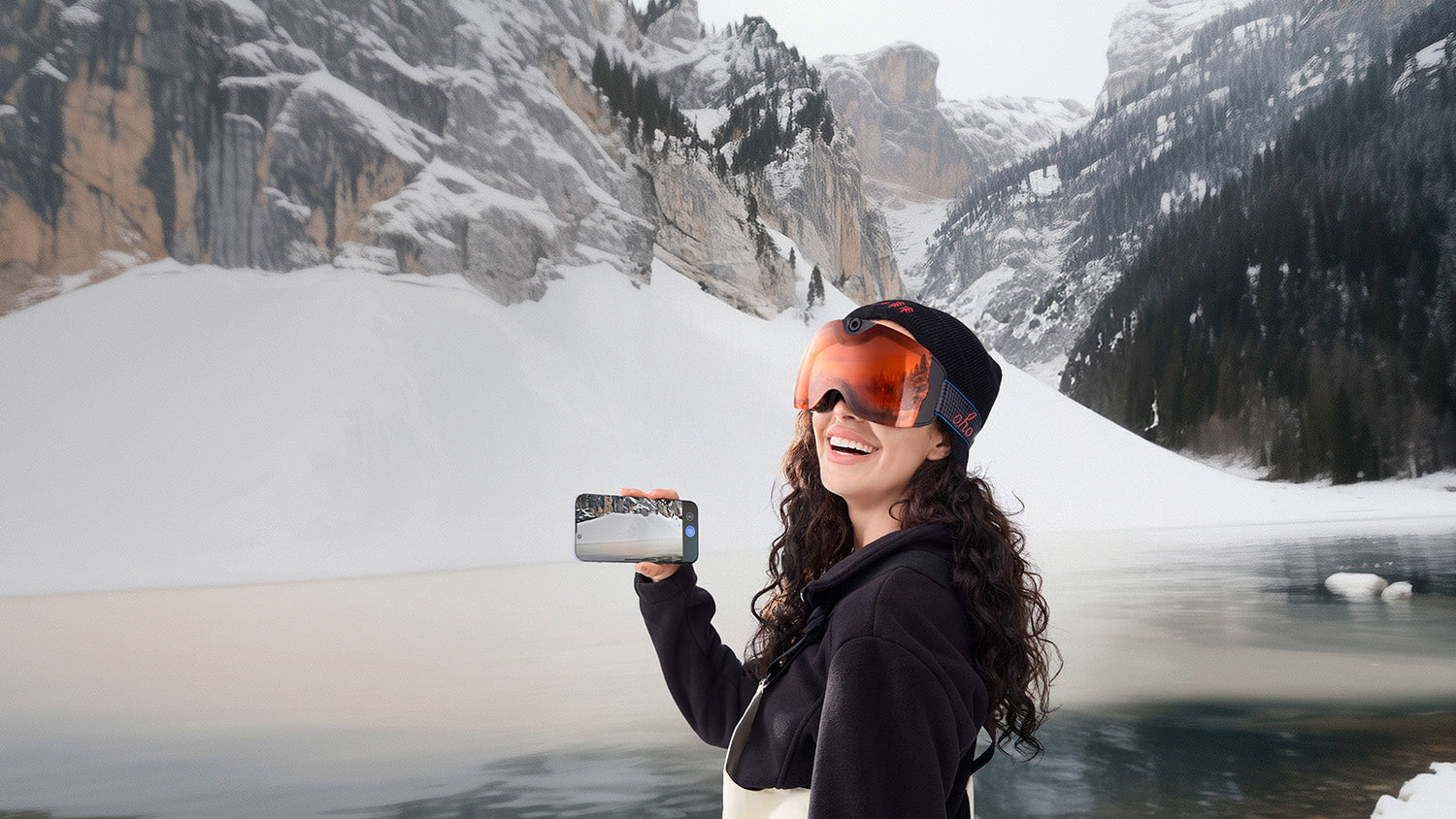
Smart goggles can mean many things, but for skiers and snowboarders, the question is simple: can they make a ski day easier to record? Camera ski goggles combine snow protection with built-in recording, so riders can capture first-person footage without holding a phone or adding another camera setup.
What Are Smart Goggles for Skiing?
Smart goggles for skiing are snow goggles with added technology, such as a built-in camera, display, audio, or connected controls. In this article, the focus is on camera ski goggles because they solve a clear ski-day problem: recording a run from the rider’s point of view without holding a phone or mounting a separate camera.
They still need to work like real snow goggles first. That means they should help protect your eyes from wind, snow, glare, and ultraviolet light while fitting comfortably with a ski or snowboard helmet. The camera feature should make recording easier without getting in the way of visibility, comfort, or slope safety.
Point of view, often shortened to POV, means the video is recorded from the wearer’s perspective. For skiing and snowboarding, that can make footage feel closer to the actual ride because the camera follows the direction your head is facing.
Why Skiers Switch From Traditional Goggles to Smart Goggles
Traditional ski goggles are built for protection and visibility. They help block wind, snow, glare, and bright sunlight. For many riders, that is enough. But skiers who also want to record their runs often end up adding extra devices.
That is where smart goggles can make sense. Instead of using regular goggles plus a separate camera, camera ski goggles combine both jobs in one frame. This can be useful for riders who want ski footage but do not want to manage a full filming setup.
The switch is often about convenience, not just technology. A phone is not easy to use on a snowy slope. A separate action camera needs a mount and angle check. A chest mount may point too low, while a helmet mount may sit above your natural view. Smart goggles can record closer to what you see while keeping your hands free.

For example, Skyshot camera ski goggles combine snow-goggle protection with built-in 4K recording. That can help riders capture selected runs without adding a separate camera to a helmet, chest strap, or pole.
This kind of setup can be useful for travel days, family ski trips, first runs on a new trail, and short clips for social media. It is also helpful for riders who want to review their line choice, body position, or turns after a run.
The best reason to switch is simple: you want to record more naturally with less gear to manage.
When Camera Ski Goggles Are More Convenient Than an Action Camera
Action cameras still have a place. They can be useful for riders who want several angles, special mounts, longer filming plans, or more advanced editing. Camera ski goggles serve a different purpose. They are built for easier POV recording during a normal ski day. The table below compares the two options for common winter recording needs.
| Need | Camera Ski Goggles | Action Camera Setup |
| POV angle | Close to the wearer’s eye line | Depends on helmet, chest, pole, or mount position |
| Setup | Camera is built into the goggles | Requires a mount and angle check |
| Gear load | One main wearable item | Camera, mount, case, battery, and accessories |
| Hands-free use | Built for hands-free recording | Hands-free after the camera is mounted |
| Eye protection | Built into the goggles | Needs separate ski goggles |
| Best fit | Simple ski-day footage | Multi-angle filming and more advanced setups |
Camera ski goggles are a strong fit when you want simple first-person clips without carrying more equipment than needed. An action camera may be better when filming is the main goal of the trip.
For most casual riders, the easier setup is often the one they will actually use. If recording takes too much time, many people stop doing it after the first few runs.
Features to Check Before Buying Smart Ski Goggles
Smart features are helpful only when the goggles still perform well in real snow conditions. Before buying smart goggles for skiing, compare both the camera side and the snow-goggle side.
Video Quality and POV Recording
Video quality affects how clear your ski footage looks after the trip. For skiing, sharper video can help capture snow texture, trees, signs, riders, and mountain views. High-resolution photo capture can also help if you want still images without taking out your phone in the cold.
A wide field of view is also important. Field of view, or FOV, means how much of the scene the camera can capture. A wider view can show more of the trail, nearby riders, and mountain background. For POV ski goggles, this helps footage feel closer to what the rider actually saw.
A model like Skyshot is useful for riders who want cleaner POV clips from ski trips, family runs, or mountain travel days. Its built-in 4K camera and wide viewing angle are designed to capture more of the slope from the wearer’s perspective.

Resolution matters, but it is not the only factor. Camera angle, lighting, movement, and how easy it is to start recording can all affect the final result.
Lens Protection and Anti-Fog Performance
Ski goggles need to protect your eyes first. Look for lens features such as ultraviolet protection, anti-fog design, impact resistance, and a comfortable frame. UV means ultraviolet light, which can be stronger on snow because bright surfaces reflect sunlight.
Fit also affects fog control. Gaps between the goggles and helmet can let in cold air or create comfort issues. REI’s ski goggle guide notes that most snow goggles are designed to work with helmets, but it is still important to check the fit with your own helmet.
Fog can ruin both visibility and recording. If your lens fogs during a run, the camera feature becomes less useful because your ski experience is already interrupted. Good airflow, proper lens care, and a secure fit all help.
Smart goggles should never trade away the basics. The best pair should help you see clearly, stay protected, and record selected moments when you want them.
Battery, Storage, and File Transfer
Battery life matters because video recording uses power. Cold weather can also affect electronics, so it is smart to record selected runs instead of filming all day without stopping. Start recording before the run, stop at the lift, and repeat for the moments you want to save.
Storage matters too. Video files can take up space quickly, especially at higher resolution. Before buying, check how the goggles store clips and how easy it is to move files after the run.
File transfer is easy to overlook, but it affects daily use. If moving videos is simple, you are more likely to save, edit, and share them. If the process feels confusing, you may stop using the camera feature.
Skyshot supports a cable and adapter-based workflow, which can help riders move clips to a computer or compatible phone after a ski day without needing a complicated mountain-side setup.
Helmet Fit and Glove-Friendly Controls
Helmet fit is a practical detail. The goggles should sit comfortably on your face, seal well enough to block wind and snow, and avoid pressure points around the nose or cheeks. The strap should stay secure without forcing the frame out of place.
Controls also matter. Skiers often wear thick gloves, so small touch controls can be harder to use. A clear button layout can make it easier to start or stop recording on the slope.
Before your first trip, test the controls at home while wearing gloves. Learn how the recording button works, how the indicator responds, and how to stop a clip. This simple step can save time once you are on the mountain.

A good pair of smart ski goggles should feel easy to wear and easy to control. If the controls are too complicated, the camera may not get used when the best moment happens.
Final Buying Checklist Before Your Ski Trip
Before choosing smart goggles, match the product to your real ski routine. A strong pair should support both snow protection and easy recording, not only one side of the experience. Use this checklist before your next trip:
- POV recording: Choose camera ski goggles if you want first-person footage without adding a separate camera or mount.
- Video and photo quality: Look for clear video, useful photo capture, and enough detail for fast-moving snow scenes.
- Field of view: Check whether the camera captures enough of the trail, nearby riders, and mountain background.
- Lens protection: Prioritize UV protection, anti-fog design, and impact-resistant materials for winter use.
- Helmet fit: Make sure the goggles sit comfortably with your ski or snowboard helmet without gaps or pressure points.
- Glove-friendly controls: Look for simple buttons or controls that are easy to use with winter gloves.
- Battery and storage: Plan for selected-run recording instead of all-day filming, especially in cold weather.
- File transfer: Choose a workflow that makes it easy to move clips to a phone or computer after the ski day.
The right choice depends on how you ski. A casual rider may want simple family and travel clips. A snowboarder may want hands-free park or powder footage. A more advanced skier may want POV video to review line choice and technique. A good pair of camera ski goggles should make the ski day easier, not more complicated.
Make Ski Footage Easier to Capture
Smart goggles for skiing are most useful when they solve a real mountain problem: recording a run without extra mounts, loose devices, or constant phone handling. Camera ski goggles give skiers and snowboarders a cleaner way to capture POV footage while keeping eye protection in place. For riders who want a simpler winter recording setup, Skyshot is built around that use case.
Camera Ski Goggles Questions and Answers
Q1. Are Ski Goggles With a Camera Worth It?
Ski goggles with a camera can be worth it if you record often and want a cleaner setup. They are useful for travel, family ski days, snowboarding clips, and first-person footage. If you rarely record, regular ski goggles may be enough.
Q2. Are Camera Ski Goggles Better Than an Action Camera?
Camera ski goggles are better for riders who want simple POV recording with fewer parts to manage. An action camera is better for users who want several angles, more accessories, or a full filming setup. The better choice depends on whether you care more about simplicity or filming flexibility.
Q3. Do Camera Ski Goggles Work With Helmets?
Many camera ski goggles are designed to work with ski or snowboard helmets, but fit can vary by helmet shape. Try the goggles with your helmet when possible and check for gaps, pressure points, or blocked airflow. A comfortable fit helps both visibility and recording stability.
Q4. What Should I Look For in Smart Ski Goggles?
Look for clear video, a useful field of view, anti-fog lenses, UV protection, comfortable fit, easy controls, and a simple file transfer method. For skiing, the goggles should protect your eyes first and record second. The best pair should make your ski day smoother, not harder.



Leave a comment
All comments are moderated before being published.
This site is protected by hCaptcha and the hCaptcha Privacy Policy and Terms of Service apply.