
























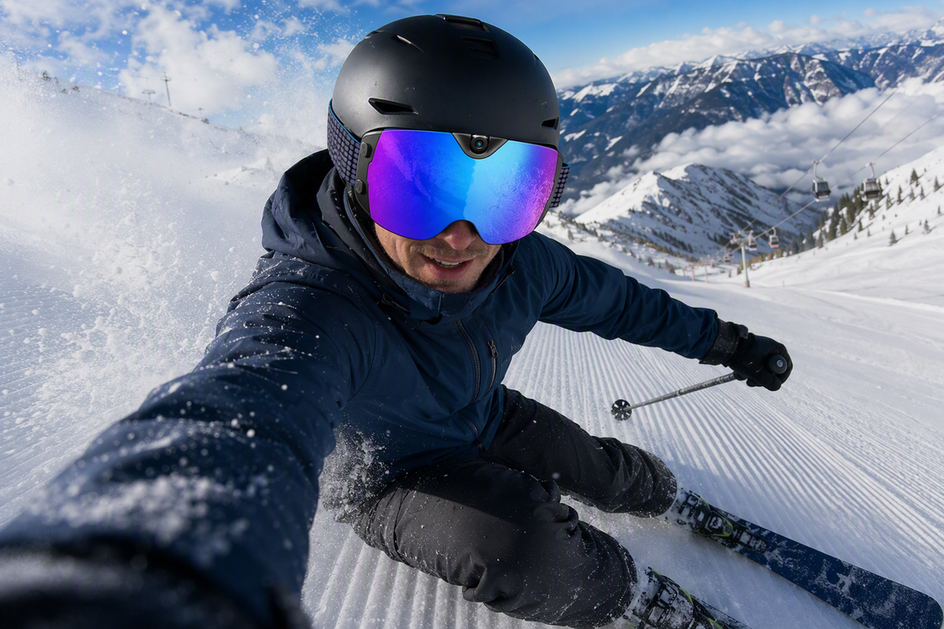
Short clips are the better default when filming with camera ski goggles on most mountain days because they keep battery life and file review manageable. Save continuous recording for the rare sequence where missing the start or finish would ruin the footage, like a technical line or a synchronized run.
A hybrid approach lets you use short clips for casual laps and continuous capture only for standout lines. This choice affects your cold-weather battery margin, how many files you sort through, how fast you can edit, and how easily you can share clips from the lodge.
Short Clips, Continuous Recording, or a Hybrid: Which Fits Your Ski Day?
Short clips work for nearly every casual resort day because they let you record only the runs you actually want to remember. When using smart snow goggles, you start the camera shortly before a chosen descent and stop once it's finished, so battery and storage go toward highlights instead of lift lines and pauses between runs.

Continuous recording earns its higher cost when losing any part of one uninterrupted sequence would hurt the result. A technical couloir, a group trick line, or a planned creator take often needs a single unbroken file so the setup, transition, and payoff stay together.
Hybrid capture is the practical middle path when a session has mixed goals. Use short clips for casual highlights throughout the day, then switch to continuous recording only for the one or two moments where continuity genuinely matters. Treat those continuous segments as planned exceptions rather than the default setting to keep your storage and review manageable.
How Recording Method Changes Battery, Files, Review, and Editing
Short clips and continuous recording carry different costs once you look past the footage itself. The real differences show up in battery margin, file count, review time, and how easily you can hand a clip off from the slope.
Short Clips: Efficient Highlights and Faster Selection
Starting and stopping around a chosen run keeps the camera active only when something worth keeping is happening, instead of recording through every chairlift wait and flat section. That habit trims battery drain and cuts down on footage you will never use.
A consistent run label, such as date, area, and run number, keeps a day's worth of short files easy to tell apart later. Because each clip already represents one decision, previewing and picking favorites takes far less time than scrubbing through a long recording. This is the more efficient choice whenever the finished result is a handful of memorable clips or a quick phone share at the lodge.

One Continuous Recording: Complete Sequences at a Higher Review Cost
Continuous recording makes sense when continuity matters more than saving battery for later runs. Because the camera stays on for the entire period, you need to plan for the full stretch rather than a single descent.
Cold weather adds to that planning problem. Sony's battery guidance notes that long recording sessions and low temperatures both reduce battery operating time, and recommends warming batteries and carrying spares sized for two or three times the expected shooting time. That same margin applies to any camera used through a cold ski day, so a continuous recording plan should assume shorter battery life than a mild-weather estimate. Expect a longer review and trimming pass afterward, since the usable moment is buried inside a longer file rather than isolated in its own clip.
Hybrid Capture: Reserve Continuity for the Moments That Need It
Hybrid capture uses short clips for ordinary highlights and switches to continuous recording only for a planned descent, transition, or repeat take that depends on staying unbroken. Separating the two modes in the file name or a quick session note keeps review organized instead of mixing short highlights with one long exception file.
Treat the continuous segments as their own small budget line: extra battery margin, extra review time, and a clear label so they do not get lost among the day's shorter clips.
| Method | Battery Focus | Review and Editing |
|---|---|---|
| Short clips | Reserved for selected runs | Quick selection, little trimming |
| Continuous recording | Covers the full period, needs cold-weather margin | Longer review and trimming pass |
| Hybrid capture | Mostly short clips, extra margin for exceptions | Reviewed by mode, exceptions handled separately |
A Run-by-Run Plan for Casual and Creator Sessions
A casual day and a creator session use the same short-clip-versus-continuous rule, but the run-by-run habits look different. Match the plan to your goal, then label everything as you go so nothing important gets lost.
Casual Resort Day: Record Only the Runs You Want to Keep
- Before the first lift, pick a small set of runs or moments you actually want to keep instead of trying to capture the whole day.
- Start recording shortly before the chosen descent and stop once it is over, rather than leaving the camera running through pauses.
- After each priority run, jot a simple identifier, such as date, area, and run number, so the file is easy to find later.
- At the lodge or end of day, transfer the selected clips first, confirm the copy, and leave the rest of the footage for a later look if you have time.
Creator Session: Plan Takes, Continuity, and Review Notes
- Write the planned sequence before riding: an establishing shot, the target line, a repeat take, a transition, and a closing moment.
- Use short clips for repeatable takes and switch to continuous recording only for the sequence where the start-to-finish flow is part of the story.
- Label each take with scene, line, and take number so the strongest version is identifiable once you are back at your laptop.
- Jot a quick technical or story note after each block, covering what worked and what to reshoot.
- Preserve the original files before editing a draft, so a rough cut never becomes the only surviving copy of a good take.
From Capture to Publish: Organize, Transfer, Edit, and Share POV Clips
Turning a day of files into shareable clips is a short sequence, not a separate project. Here is how to organize ski POV clips from the mountain to your feed without losing the original footage along the way.
- Name files the moment you capture or import them, using a pattern like date-area-run or date-scene-take so nothing gets mixed up.
- Move footage off the camera promptly and keep a backup copy before you start deleting or trimming anything.
- Sort clips into folders or tags by day or trip so standout runs are easy to locate later, a habit covered in more depth in this file-management workflow guide for repeated recording days.
- For a compatible phone setup, Apple's guide describes selective iPhone media import for quick sharing, plus exporting unmodified originals to external storage when you want to keep the source file intact for later editing.
- Edit from the preserved original rather than a compressed share, and run a privacy check before you post for faces, voices, minors, and location clues before choosing your audience.
How Camera Ski Goggles Fit This Workflow
Once you know whether you want short clips, one continuous take, or a hybrid mix, a hands-free camera changes how easy that plan is to follow on the hill. The OHO SUNSHINE 4K Camera Smart Ski Goggles record at 4K/30 fps with a 140° wide-angle view, so you can capture a run at eye level without holding a phone or a separate action camera.
The anti-fog lens, WiFi connection, and USB-C charging support the same file-transfer habits described above: footage saves as standard MP4 video, and you can move it to your phone or computer through the goggles' wireless or wired connection before editing. These features support hands-free capture and everyday file handling, but they do not establish a specific recording duration or cold-weather runtime, so keep conservative battery planning in mind on a long or very cold day.
If you are comparing snow goggles with a camera against a standard pair, exploring our wider range of camera ski goggles is a reasonable next step before you settle on a specific model for your snow gear upgrade.
Match the Recording Method to the Day
Default to short clips for most ski and snowboard days to keep battery life, file storage, and editing manageable while capturing your best runs. Reserve continuous recording for the rare sequence where uninterrupted flow is essential, or use hybrid capture when your session includes both goals. Before sharing any footage publicly, always preserve your original files and run a quick privacy review for bystanders.
FAQs
Should I keep the original clip after making a social-media edit?
Yes. Treat a social edit as a copy made from the source file, not the master. Keep the unedited original until you have confirmed the edit exported correctly and both files are backed up, so you can re-edit or re-export later if needed.
Can I use the same recording workflow for snowboarding?
Yes. The same decision applies: short clips for selected highlights, continuous recording for a sequence where continuity matters, and hybrid capture when a session has both goals. Nothing about the file-naming, transfer, or privacy steps changes for snowboarding footage.
Should I record the lift ride between runs?
Only if it adds something to the finished result, such as a scenic transition or a story beat between two runs. If it is just downtime, skip it. Recording every lift ride adds low-value footage that takes extra time to review without improving the final clip.
What should I do if a run includes an identifiable child or stranger?
Avoid posting the clip unchanged if a child or an identifiable stranger is clearly visible. Trim the section, blur the face if your editor supports it, choose a narrower audience like close friends, or keep the clip private if you cannot resolve the concern another way.


Lämna en kommentar
Denna webbplats är skyddad av hCaptcha och hCaptchas integritetspolicy . Användarvillkor gäller.