
























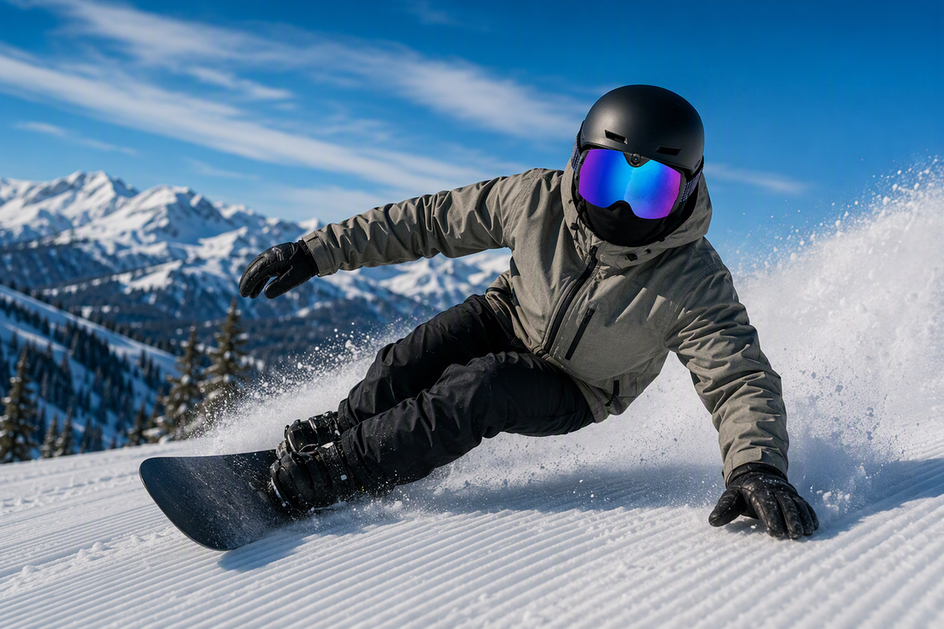
Filming snowboard carving in bright light? For smoother slow motion, start with 4K at 60 fps, if your goggle camera supports it and your editing workflow can handle the data. For simple playback, lower light, or smaller files, 4K at 30 fps is more practical. There's no universal winner, since frame rate, motion blur, exposure, and stabilization each affect the clip independently.
Mogul skiing changes the calculation. Repeated bumps and terrain drops can shake the camera enough that stabilization matters more than frame rate alone. Test both modes on a short section first, watching for judder, blur, and unstable framing rather than assuming higher frame rate wins.
4K Resolution vs. Frame Rate
4K resolution and frame rate solve two different problems, and mixing them up leads to the wrong setting choice. Resolution controls how much spatial detail your camera captures in each frame, while frame rate controls how many times per second it samples motion.

What 4K Changes
4K is a spatial spec. It determines how much detail sits in every frame, which gives you more room to crop or reframe a clip during editing without losing sharpness. What 4K does not do is increase how often the camera records a new frame each second. A 4K clip shot at 30 fps still only samples motion 30 times per second, so a fast carving turn can look just as choppy at 4K as it would at a lower resolution. Treat resolution as an editing-flexibility spec, not a motion-smoothness spec.
What 30 fps and 60 fps Change
Frame rate is the temporal spec, and it changes how motion actually looks on screen. Filming at 30 fps keeps your editing workflow straightforward: it is the standard real-time rate and typically produces smaller, easier-to-manage files. Filming at 60 fps records twice as many temporal samples per second, which can make rapid motion like a fast carving pan look smoother and provides extra flexibility for slow-motion playback. A higher frame rate only helps if your camera supports the mode and your export or playback setup can use those extra frames. Recording 60 fps footage that gets played back or edited at 30 fps wastes the benefit.
Why Blur, Exposure, and Storage Still Matter
Frame rate is not a complete fix for motion blur. Motion blur is largely a function of exposure and shutter behavior, so a clip can still look smeared at 60 fps if the camera's exposure settings cannot keep up with bright snow glare or a fast pan. Adobe's video settings guide notes that higher frame rates generally produce smoother motion, but temporal smoothness remains separate from frame sharpness. Higher frame rates also carry a real workflow cost: Adobe's compression documentation notes that higher frame rates require more data, which means larger files and heavier transfer or editing loads. If your final output is a real-time video for friends or social media, matching your source rate to that delivery format usually makes more sense than chasing the highest available frame rate.
| Mode | Temporal behavior | Main condition |
|---|---|---|
| 4K / 30 fps | Standard real-time sampling, lighter files | Best for lower light, real-time playback, or simpler editing |
| 4K / 60 fps | Denser sampling, smoother fast motion | Needs camera support, enough light, and a workflow that uses the extra frames |
Carving vs. Moguls
The better starting mode depends on how your run moves the camera, not just on which frame rate sounds higher. Carving stresses the camera with fast lateral panning, while moguls add repeated vertical impacts.

Snowboard Carving
When carving on groomed snow with snowboard goggles, fast edge changes create wide lateral pans across the slope. That kind of sweeping motion is where extra temporal sampling helps most, making 4K/60 a reasonable starting point when the run is bright enough and you plan to review the footage in slow motion or want smoother playback. If light is limited, you want simple real-time footage, or you prefer smaller files, 4K/30 is the sensible alternative. Either way, check your turn transitions in a review clip, since a higher frame rate does not automatically fix blur at the exact moment your board changes edges.
Mogul Skiing
Moguls create a very different problem. According to REI's guide to skiing moguls, the terrain involves repeated bumps and linked turns that force constant balance adjustments, and REI's snowboarding advice emphasizes that active bump absorption through flexed legs is essential across uneven terrain. That repeated compression and extension can shake a goggle-mounted camera in ways that frame rate alone cannot solve. Use 4K/60 for moguls only if a short test clip actually looks cleaner in that mode. Otherwise, 4K/30 is a solid choice, and the real decision point is whether the footage remains stable and clear.
How to Reduce Judder
The fastest way to pinpoint visible judder is a short matched test before filming an entire run. Testing both modes on the same slope helps separate camera vibration from frame rate limits.
- Seat the goggles securely and wipe the lens clean, since a loose fit or foggy lens can mimic camera judder even when your settings are correct.
- Record the same short carving line, and a short mogul section if accessible, in each available recording mode under similar lighting conditions.
- Review both clips at the output format you plan to use, whether that is real-time playback on a phone or a slow-motion edit.
- Inspect a cropped section of turn edges or a frame-by-frame segment for blur, judder, and camera vibration rather than judging the whole clip at a glance.
- Pick the mode that fixes the specific problem you saw, and match your editing sequence's frame rate to that source clip. Adobe's export guidance points out that matching source and delivery frame rates avoids playback artifacts from rate conversion. If you need to verify your camera angle before testing, a camera ski goggles framing test can rule out alignment issues first.
Skyshot Buyer Fit
The OHO SUNSHINE 4K Camera Smart Ski Goggles provides a documented 4K/30 fps camera with a 140° wide-angle lens, H.265 video compression, USB-C charging, and up to 90 minutes of battery life for skiing and snowboarding. This setup fits riders who prioritize clean real-time playback, reliable low-light exposure, and manageable file sizes over slow-motion editing flexibility.
The Skyshot operates at 4K/30 with a wide 140° view, but it does not feature 4K/60 recording, active image stabilization, or manual exposure settings. If your workflow specifically requires 4K/60 for fast carving pans or slow-motion clips, you will need a different recording setup. For riders comparing snowboard goggles more broadly, our smart snow goggles collection offers alternative models to match your specific frame rate and filming needs.
Conclusion
Start with 4K/60 for fast carving pans or slow-motion output when your camera supports it and lighting is sufficient. Use 4K/30 when real-time playback, lower light, or a lighter workflow matters more. For moguls, run a short matched test before trusting either mode for a full day, since vibration often matters more than the frame rate number.
FAQs
Does 60 fps automatically eliminate motion blur in ski-goggle video?
No. A 60 fps setting increases temporal sampling, but shutter speed and available light govern motion blur. A clip can still look blurred at 60 fps if the shutter speed drops in dim light or during rapid head movement. Running a quick test on snow reveals whether blur stems from lighting, camera shake, or frame rate.
How much more storage does 4K/60 need than 4K/30?
4K/60 generally creates larger files than 4K/30 because it encodes twice as many frames per second, but the exact file size depends on the camera's bitrate and compression format. Because bitrates vary across models, record a short sample clip in each mode to check the storage demands on your memory card before a full day on the mountain.
Can the Skyshot record 4K video at 60 fps?
The Skyshot records 4K video at 30 fps and does not list a 4K/60 mode. If 4K/60 capability is required for your POV edits, choose a dedicated high-frame-rate device. For standard real-time runs, the Skyshot delivers 4K/30 footage with a 140° wide-angle view.



コメントを書く
このサイトはhCaptchaによって保護されており、hCaptchaプライバシーポリシーおよび利用規約が適用されます。